

To increase average order value in WooCommerce, help customers build a more useful order and measure what remains after costs. A larger basket is useful only when the additional revenue justifies the extra goods, fulfillment and acquisition costs. Start with one relevant change, rather than applying a store-wide discount.
Calculate a baseline before changing the offer
WooCommerce Analytics defines average order value as net sales divided by orders. Net sales accounts for returns and coupons and excludes shipping revenue and taxes. Use the same date range and reporting settings when comparing periods. The official WooCommerce Analytics and Sales Reports documentation, consulted October 27, 2026, provides these definitions.
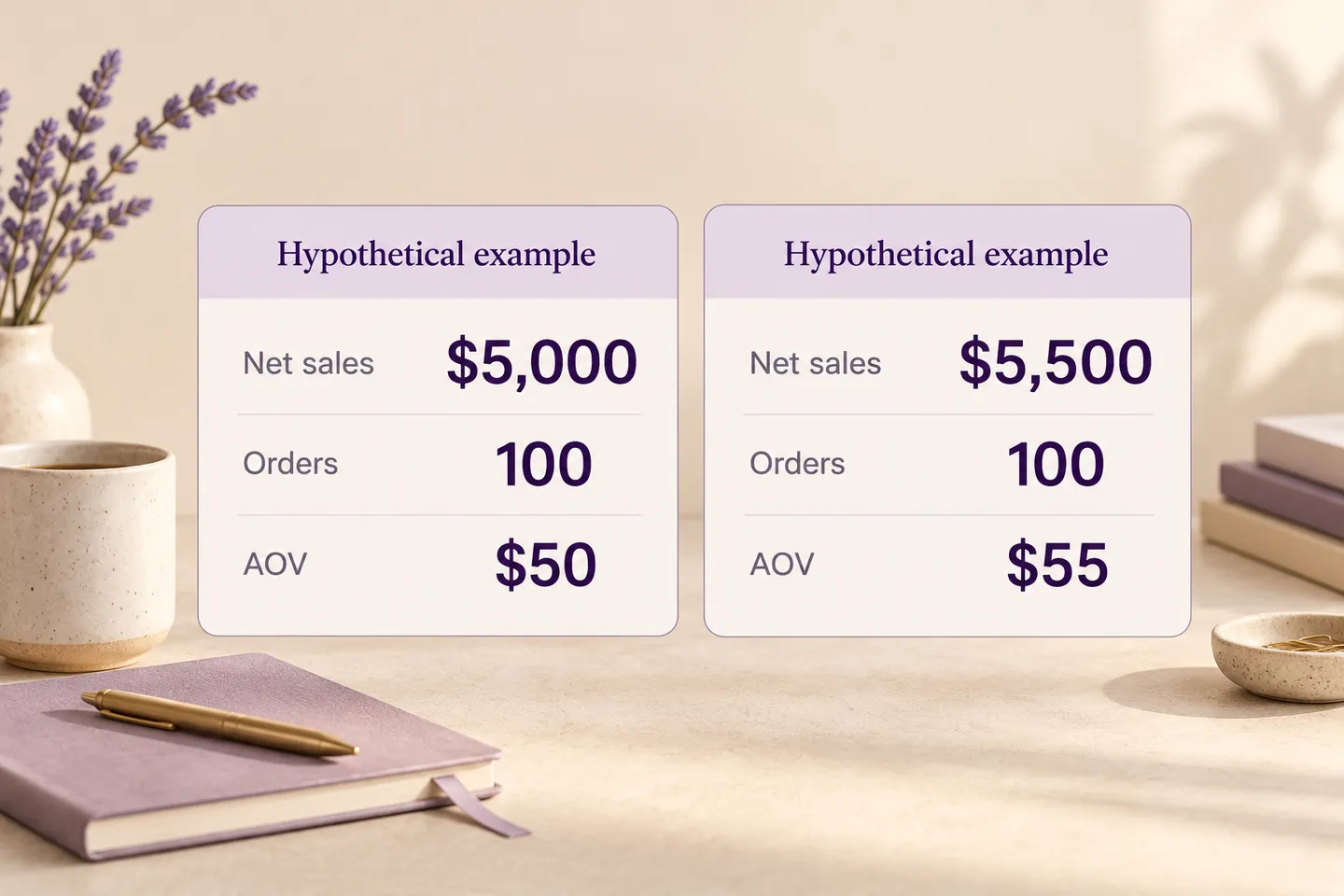
For example, US$5,000 in net sales across 100 orders produces an AOV of US$50. US$5,500 across 100 orders produces US$55. These are hypothetical calculations, not results from a HookSpark customer. A change in product mix, traffic or returns could also change the number.
1. Offer a useful optional upgrade
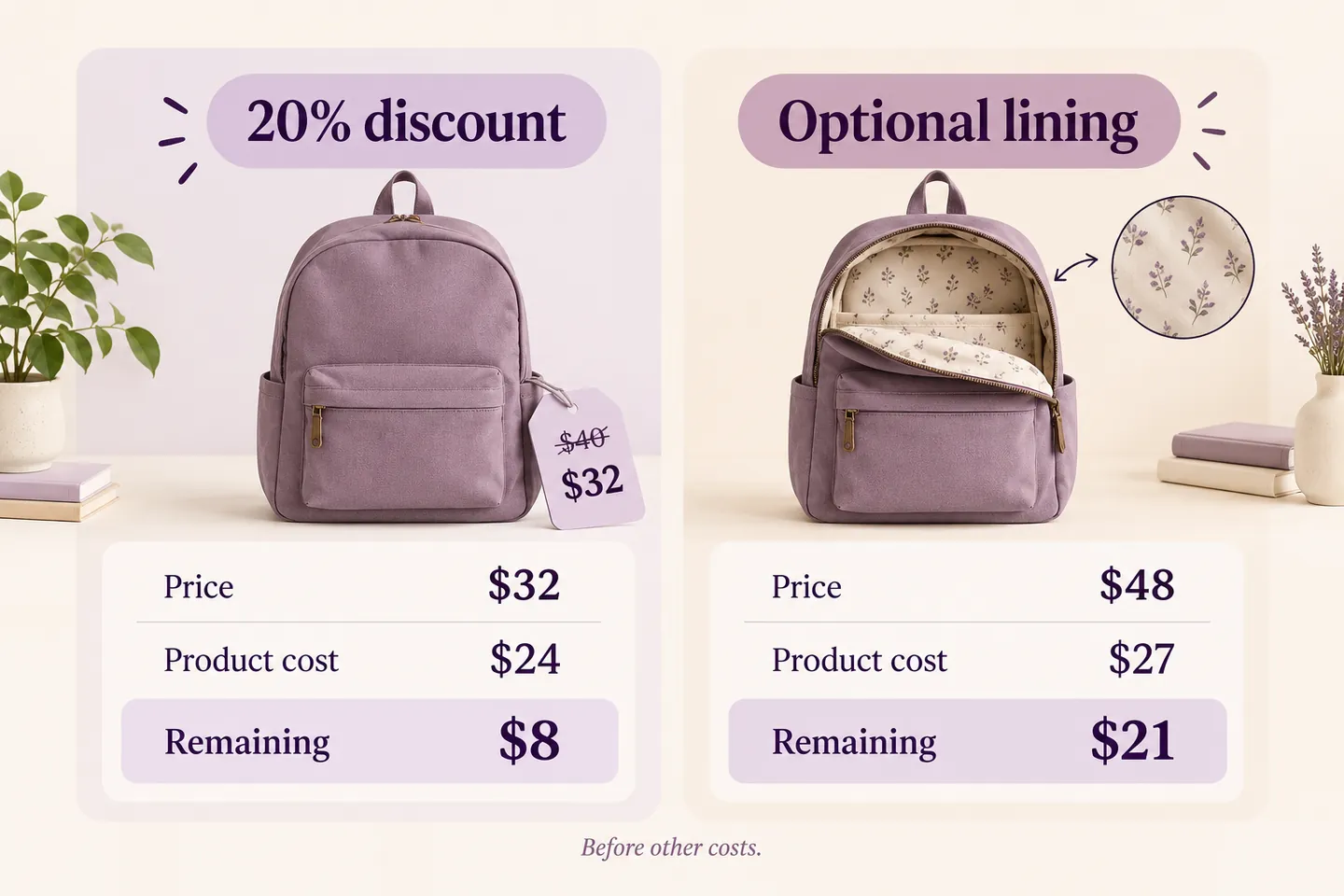
A US$40 backpack with an optional US$8 lining becomes a US$48 product when the shopper selects it. The decision should solve a real need and show its cost before purchase. Keep the standard backpack available; an unwanted mandatory extra can undermine the offer.
In this illustration, the backpack costs the merchant US$24 and the lining costs US$3. The remaining amount before other costs is US$16 for the standard product and US$21 with the lining. Selling the standard backpack at a 20% discount instead leaves US$8. This comparison omits fulfillment, payment fees, returns and advertising; it illustrates why revenue and contribution need separate checks.
HookSpark Product Options & Add-Ons can collect the optional choice and its fixed extra price. Our paid product options tutorial explains the actual checkbox setup and quantity calculation. This strategy guide helps you decide whether the upgrade deserves to exist.
2. Suggest something that belongs with the purchase
A compatible replacement filter beside a coffee machine is more useful than an unrelated popular product. Explain compatibility, quantity and the combined price. If choosing the extra requires dimensions or personalization, send the shopper to the relevant product page instead of assuming a quick add is sufficient.
Start with a small set of combinations you can fulfill reliably. Do not describe a recommendation as personalized or AI-driven unless the system actually uses those capabilities. Track accessory take-up and returns alongside order value; more add-ons are not a success if they are routinely unsuitable.
3. Make a shipping incentive economically sustainable
A minimum spend for free shipping can encourage a useful additional purchase, but a higher basket can also absorb a new delivery subsidy. Calculate the cost for the relevant destination and product mix. A heavy item and a light accessory may have very different economics.
Use our guide to calculating a free shipping threshold for the financial decision. It is separate from setting a mandatory minimum order: a customer below a free-shipping threshold may still be allowed to buy using a paid delivery method.
Choose one test and define a stopping rule
Record the original offer, dates, traffic sources and measurement method. If you can run a properly configured split test, compare equivalent groups; otherwise treat a before-and-after comparison as directional evidence. Avoid changing prices, advertising and shipping policy together and then attributing the result to one feature.
| Signal | Question |
|---|---|
| AOV | Did net sales per order increase? |
| Conversion | Did fewer visitors complete a purchase? |
| Contribution | What remains after the costs included in your model? |
| Returns and support | Did the extra choice create unsuitable orders? |
Set a review date and a maximum acceptable deterioration in contribution or conversion based on your own business. Small samples and seasonal traffic can be misleading. There is no universal AOV uplift or winning threshold that this example can promise.
Common questions
Do I need to discount every product?
No. Relevant upgrades and compatible additions can increase the amount spent without reducing every price. Customers still need a clear reason to choose them.
Is a higher AOV always better?
No. Fewer purchases, higher delivery costs or more returns can offset it. Compare contribution and completed orders as well.
Should I copy another store’s shipping threshold?
No. Use your product margin, fulfillment costs, destination and customer behavior. The other store may have a different cost structure.
Choose one product and one useful optional addition. Check the product page checklist, then measure the outcome before extending the change across the catalog.