Jump to a topic
- First setup
- Appearance and preview
- Cart entry points and visibility
- Empty cart
- Quantities, options and recovery
- Free shipping and product suggestions
- HookSpark integrations and languages
- Diagnostics and removal
- Test before use
- Data and privacy
- Changes from multiple tabs
- Interrupted file update
- Sale and coupon presentation
- Starting values
- Three practical setup checks
- When the result is unexpected
- Page cache and session recovery
- Alpha59 — expanded cart features
- Shipping, saved items and editing options — alpha59
- Public coupons, optional products and gifts
- Personal presets and layout compositions
- Local observations and privacy
- New-feature test recipe
- Screenshots
Side Cart — laboratory guide
Free edition: English guide · Guida italiana. This handbook covers Premium.
This handbook describes the workflows introduced in 0.1.0-alpha.59 on 25 September 2026. The current Premium version is 0.1.0-alpha.62; review its availability and dated compatibility notes before installing. Test changes on a staging WooCommerce site. The alpha59 expansion was verified on WordPress7.1.2/WooCommerce11.1.0, locally and on protected hosting, including an offline test order. Earlier alpha57 reports cover the minimum WordPress6.8/WooCommerce10.6.0 stack; they do not certify every new feature on that stack. Full beta acceptance and wider compatibility remain open.
Try the storefront or create a personal admin demo.
First setup
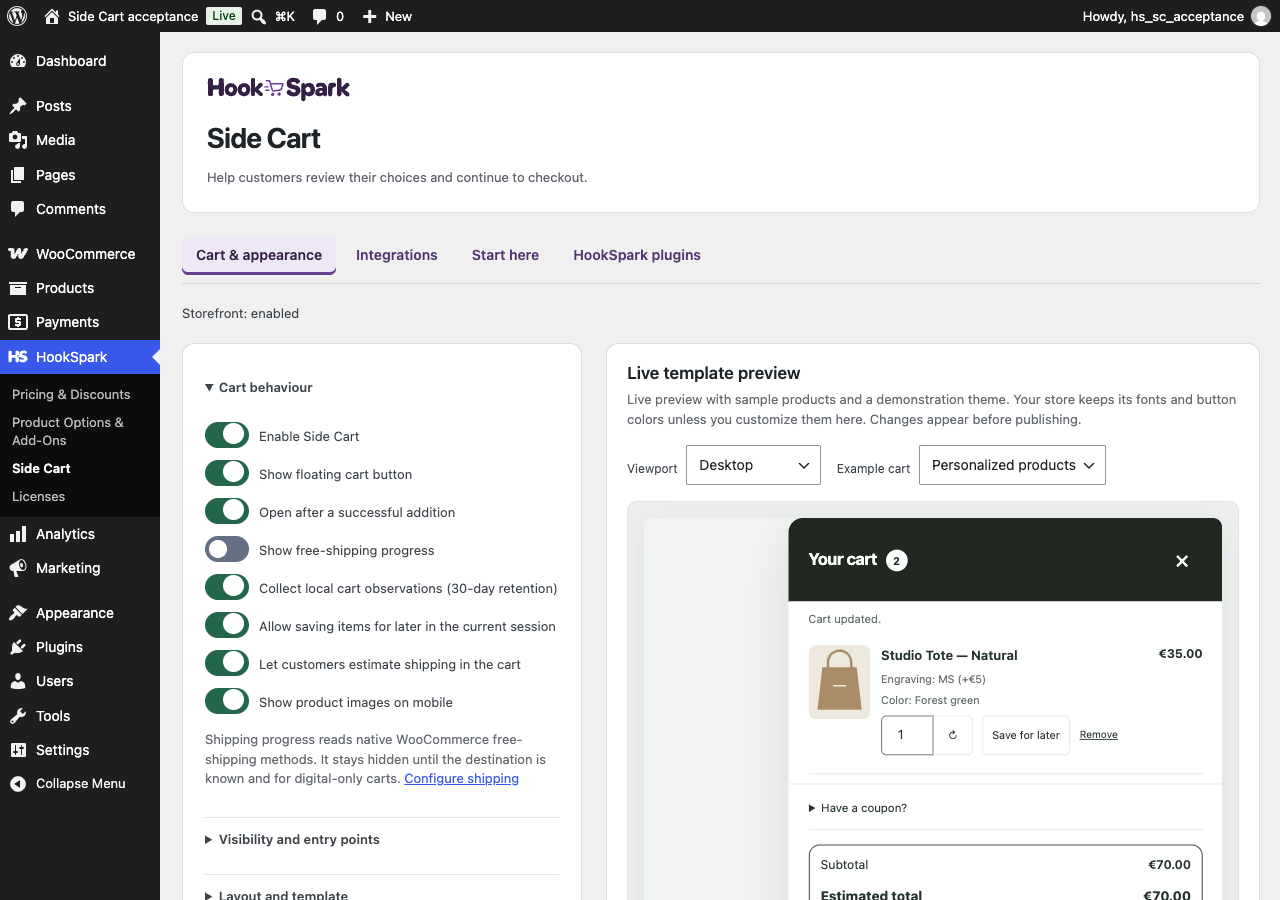
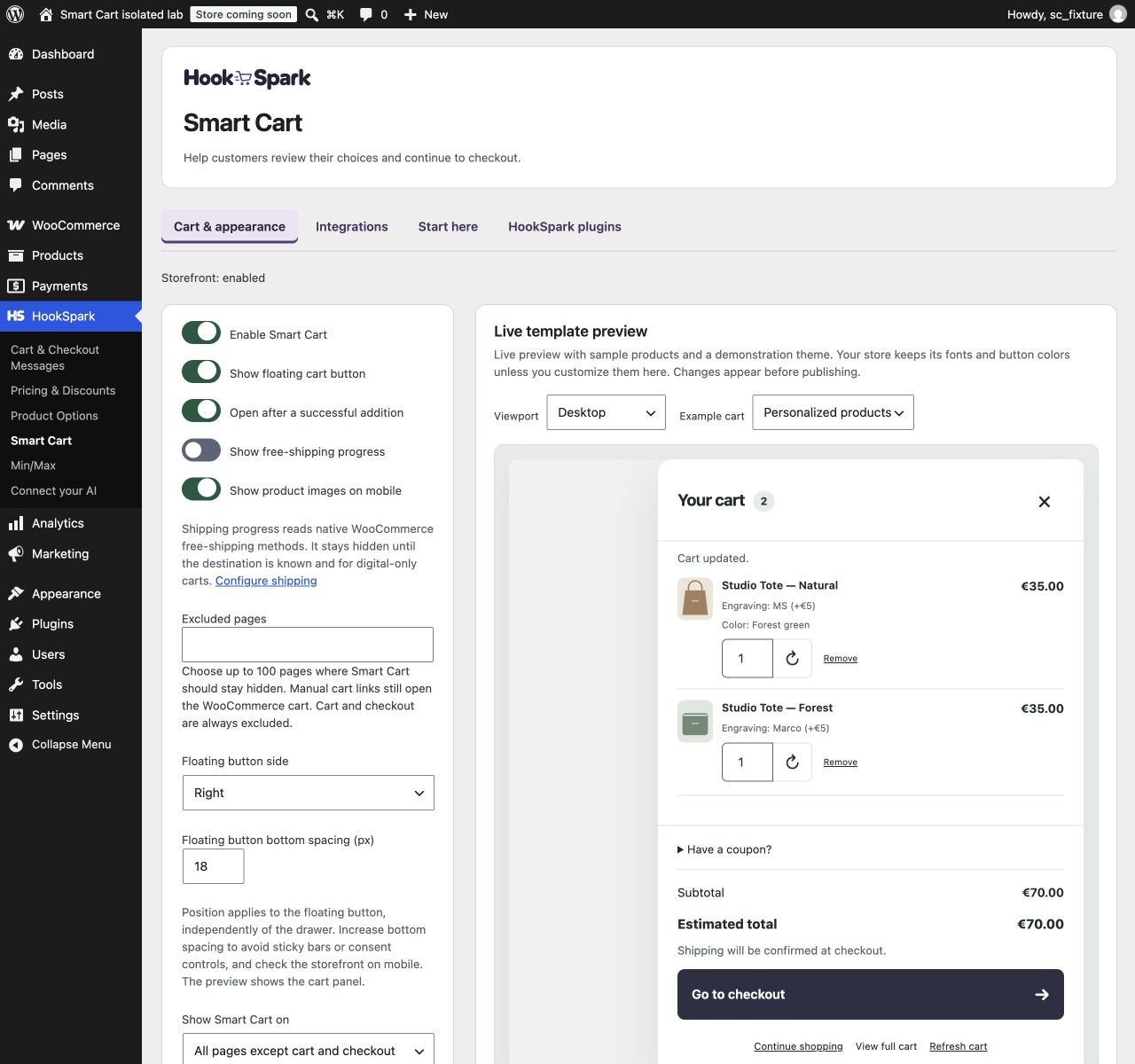
Open HookSpark → Side Cart → Cart & appearance. Side Cart, the floating button, automatic opening, shipping progress and suggestions are off by default. Select a template and an entry point, review the preview, then enable Side Cart and publish when ready.
Save draft stores your work without changing the published configuration. Publish applies the validated configuration. Restore previous restores the previous published configuration; it does not roll back WooCommerce prices, orders or tax settings. If validation fails, correct the indicated field. Your submitted values remain on screen. If WordPress rejects a draft or publish save, Side Cart shows an error and retains the submitted fields so you can retry. A failed restore shows a separate error; it does not save your unsaved form edits.
Appearance and preview
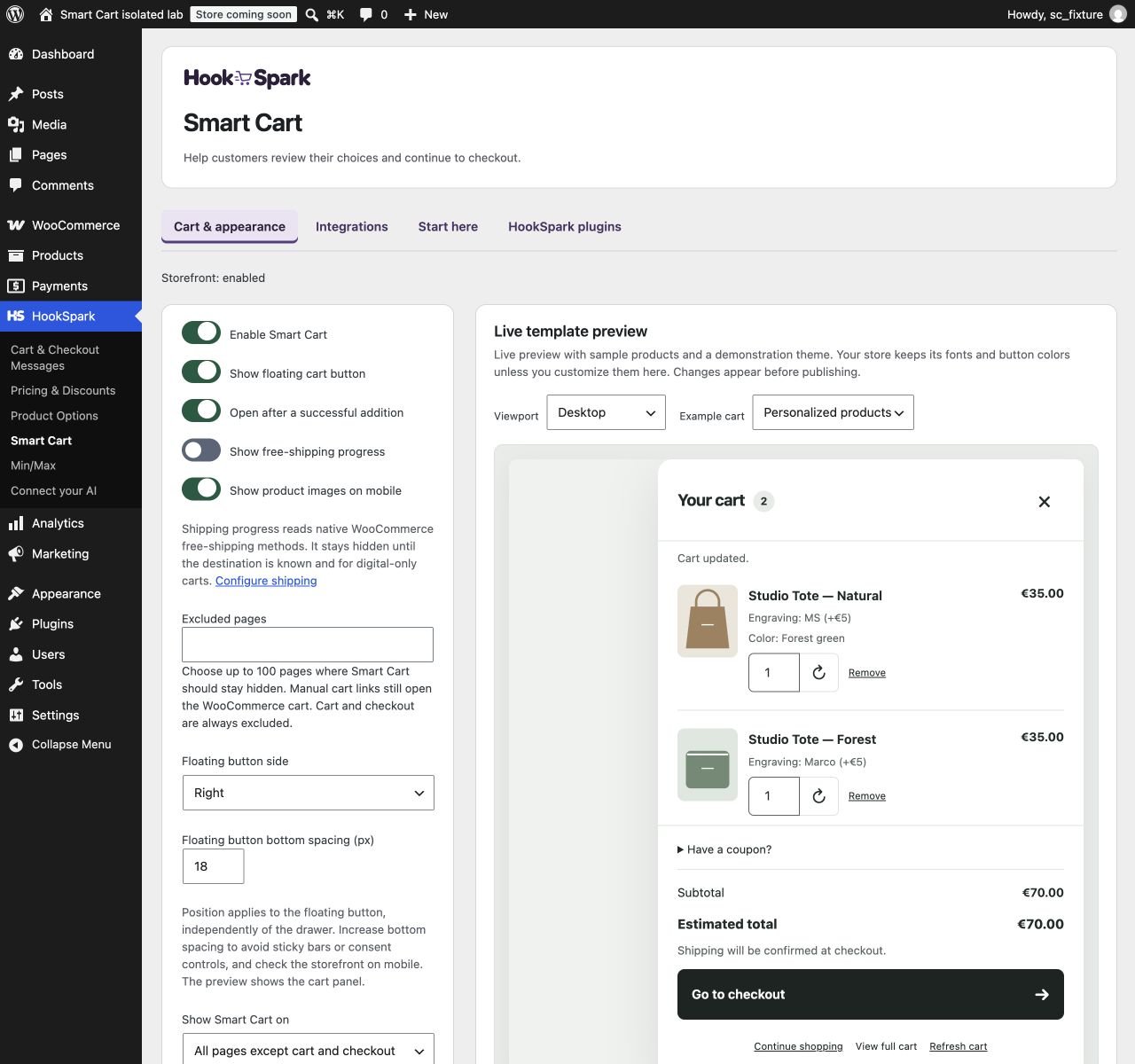
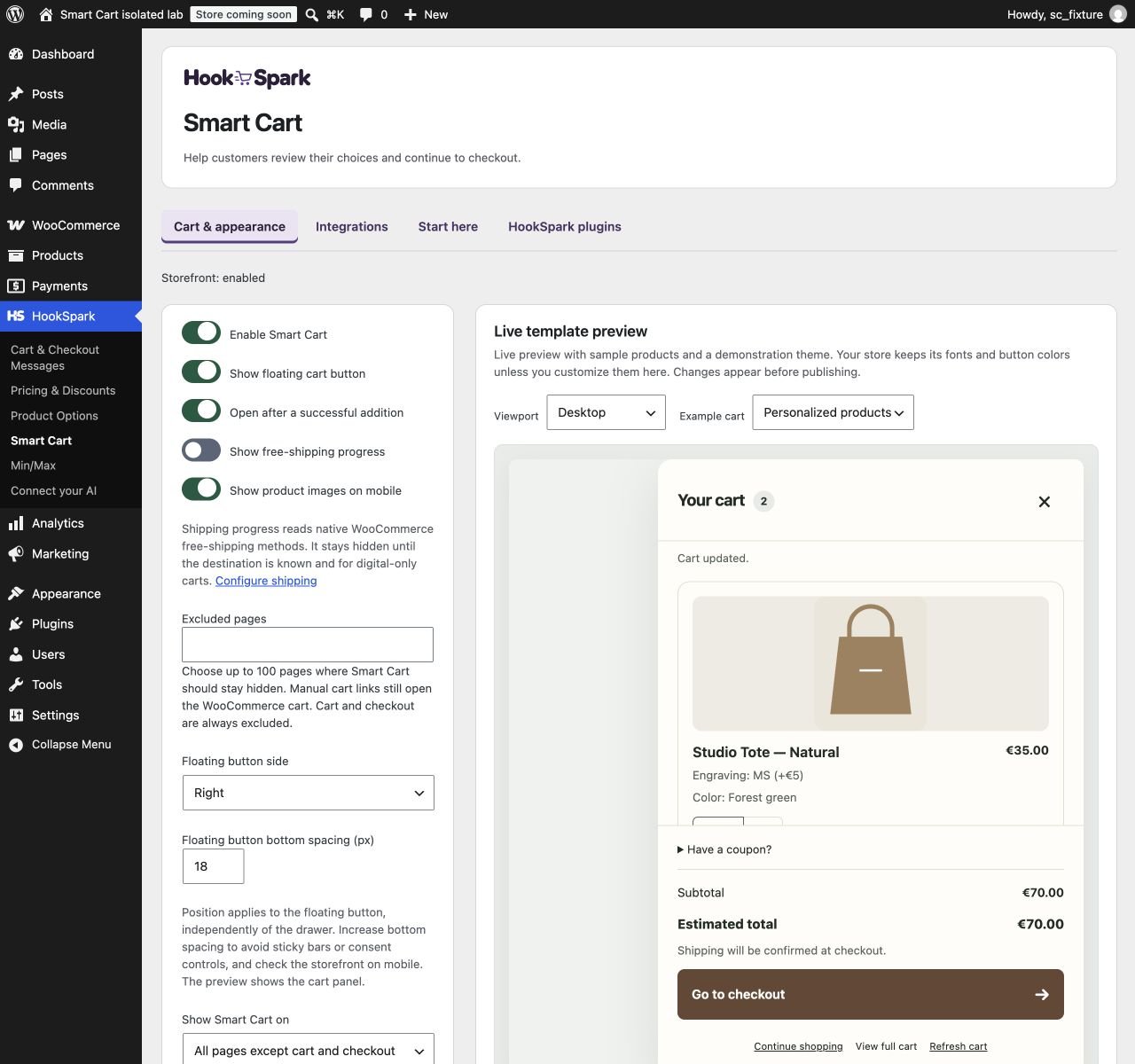
Essential uses familiar product rows. Boutique gives images and details more space. Compact concentrates information for longer carts. Drawer and Modal show the same cart; a drawer can open from the right or left. Fonts come from your theme, without a remote font service added by Side Cart.
The preview uses sample data and the same cart renderer. Try desktop and mobile widths, an empty cart, a stock error and long personalization details. Preview controls cannot place orders or change the real cart. Always test the storefront too.
Under Text, colors and sizing, customize the heading, checkout and continue-shopping labels, empty-cart text and service information. Blank fields use defaults. Text must be plain text, without HTML. Labels allow up to 120 characters, service information 240 and URLs 500. A service link requires both text and a valid HTTP/HTTPS address.
Desktop width accepts 320–960 pixels, bounded by the available screen space. Mobile product images are on by default and can be hidden. Set panel background/text and checkout-button background/text as pairs: explicit color pairs must reach a 4.5:1 contrast ratio. This validation does not certify the accessibility of your entire theme.
Cart entry points and visibility
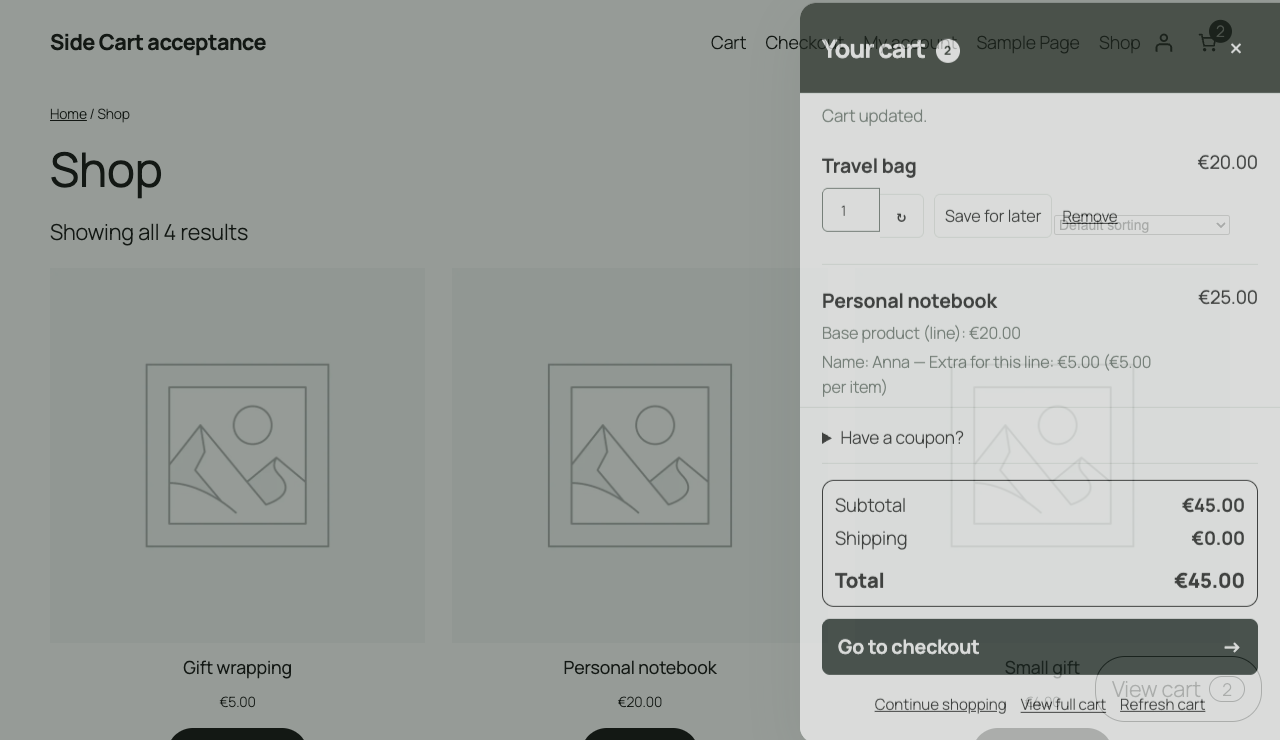
Use a floating button, a classic menu location, the Side Cart link block or [hs_smart_cart] in a supported shortcode area. Keep a native WooCommerce cart link as a fallback. Side Cart does not automatically replace theme or builder drawers; choose one primary cart overlay to avoid duplicate openings.
Choose the floating button’s left or right side independently from the drawer. Bottom spacing accepts 0–300px (default 18px), adds to the native Storefront mobile-bar clearance and is capped in short viewports. Adjust it around chat, consent banners and sticky bars, then check the storefront: the preview shows the cart panel. Publish to apply.
Open after a successful addition is optional. It works with the tested native add-to-cart paths, including WooCommerce forms that reload the page. The latter use a functional hs_sc_added_ cookie lasting at most one minute, without cart contents or customer details. Manual opening remains available if the browser blocks this cookie.
Choose whether to show Side Cart throughout the site, on catalog surfaces or on product pages. Excluded pages accepts up to 100 pages, including Shop. Publish to apply changes. The cart and checkout pages are always excluded from the overlay; manual links retain the native WooCommerce destination. Remove a page from the exclusion list and publish to enable the overlay there again.
Empty cart
Browse products links to the WooCommerce shop by default. Under Text, colors and sizing, change its label and destination—for example, to a collection page. Leave fields blank for defaults. A custom destination must be a full HTTP/HTTPS URL. The empty preview shows the result without navigating. Publish to apply it. Checkout remains unavailable while the cart is empty.
Quantities, options and recovery
After editing a quantity, use Update quantity. Checkout is unavailable through the panel while an unconfirmed quantity differs from the server value. WooCommerce remains authoritative for prices, discounts, taxes, stock and limits. The panel reconciles after responses and supported updates from other tabs.
Personalization appears in the product row. Longer detail sections can be collapsed; their state is retained during recalculation of that row. Products with different customizations remain separate cart lines. Use Change variation to edit a native variation inside the panel. Supported Product Options & Add-Ons rows reopen their configurator with the existing choices. WooCommerce validates each change; a rejected change preserves the original row. See the alpha59 editing instructions below for supported controls and limits.
Remove removes the selected row. Undo revalidates whether the product can still be purchased and may be refused if stock, options or session state have changed. Out-of-stock products have a panel message and a row-level message; remove the affected item to continue. Quantities sharing an inventory owner are considered together. WooCommerce may correct quantities and totals when stock decreases. External inventory providers need dedicated testing.
Expand Have a coupon? to enter a code. An error leaves the input available for correction. Applied coupons can be removed individually. Totals reflect WooCommerce responses; shipping that cannot yet be calculated is not presented as free.
If a write request cannot be confirmed, editing actions are paused. Use Refresh cart to retrieve the server state before trying again. If the problem persists, View full cart provides the native WooCommerce route. A missing confirmation does not necessarily mean the change failed.
Free shipping and product suggestions
Shipping progress reads native WooCommerce methods, destination, zone, thresholds and coupon conditions. It may remain hidden until an applicable reward can be determined, and stays hidden for digital-only carts. Removing a coupon or changing quantity can change progress or revoke free shipping. Custom shipping providers are not automatically supported.
Choose Selected products or WooCommerce cross-sells for suggestions. Select up to 30 manual candidates in display order; at most three eligible products appear. There may be fewer or none. Unavailable, unpurchasable and already-added products are excluded. These relationships are not presented as purchase statistics.
For a standard variable product, select all attributes and wait for price and availability before adding it. Unavailable combinations cannot be added. When required customizations need the product configurator, Choose options opens that product. Final cart prices include applicable rules. Suggestions never add products automatically.
HookSpark integrations and languages
Integrations shows local activation status and links. An active plugin does not certify every combination. Product Options & Add-Ons owns configurations and surcharges; MinMax owns quantity constraints; Pricing owns discounts; Messages owns its messages. Avoid duplicate shipping indicators when using Messages. Tested versions and economic scenarios are linked from the feature specification (FEATURE_SPEC.md).
HookSpark plugins shows the shared catalog. Visiting it does not install or activate products. Available actions depend on permissions and product status.
Side Cart's own strings are available in English and Italian. Storefront language follows the site; administration follows the user profile. Merchant content, product names and strings from WooCommerce, themes and other plugins use their respective content and translations. Saved custom labels are not translated automatically.
Diagnostics and removal
Start here checks the published activation state, assigned checkout page and native cart surfaces in block-theme templates, synced patterns and active widgets. Inspection has depth and size limits and does not automatically cover builders or dynamic patterns. A published checkout page does not prove its form and payment method work: place a test order. No detected Mini-Cart block does not rule out builder, widget or third-party drawers.
The technical report is collapsed by default. Download diagnostics creates a local file containing versions, plugin status and checks. It excludes customer data and tokens and is not sent automatically. Review it before sharing it with support.
Deactivation preserves settings and leaves products, coupons and orders with WooCommerce. Reactivation restores the published configuration. Before removing the plugin permanently, replace its blocks and shortcodes with native cart links where needed.
Settings are retained on uninstall by default. To remove them, open Data retention, enable Delete Side Cart settings when uninstalling, and Publish. Saving a draft alone does not change this policy. To revoke the choice, turn it off and publish again. Deleting the plugin then removes only Side Cart's draft, published and previous settings. Orders, products and WooCommerce data remain. Default retention and explicit deletion have been tested in the single-site laboratory; multisite is not certified. Keep a consistent file/database backup before permanent removal.
Test before use
On desktop and mobile, try simple and variable products, required options, valid and invalid quantities, coupons, remove/undo and checkout. Compare amounts and details with the resulting WooCommerce order using a test payment method without a real charge. Also test stock loss and recovery after an error.
The feature specification (FEATURE_SPEC.md) is the status source. The beta scope (BETA_SCOPE.md), order evidence (BROWSER_ORDERS_ALPHA14.md), stock evidence (STOCK_LOSS_ACCEPTANCE.md), tax/shipping evidence (TAXED_SHIPPING_ACCEPTANCE.md), lifecycle evidence (LIFECYCLE_ACCEPTANCE.md) and developer contracts (PUBLIC_EVENTS.md) describe coverage and limitations. Universal compatibility, embedded checkout, checkout-field editing and express payment are not promised by this product.
If a stored draft is malformed, the editor uses valid published settings, or disabled defaults. Opening the editor does not overwrite stored data; publish a corrected configuration to replace it. Malformed previous snapshots are rejected without a partial restore.
Automatic opening respects another visible dialog, such as the WooCommerce mini-cart: cart data still refreshes without opening a second panel. Keep one primary cart surface configured.
Data and privacy
Side Cart uses the WooCommerce session. Optional local analytics, disabled by default, are documented below; no remote analytics service is connected. The native-addition signal is a one-minute functional cookie. Diagnostics are downloaded explicitly, without automatic submission. Store-configured images may load from external hosts. See the data inventory and verification limits (PRIVACY_ALPHA46.md) (Italian).
Changes from multiple tabs
Side Cart coordinates participating browser tabs when Web Locks is available. The current plugin also coordinates native WooCommerce sessions on the server before reading the cart and through saving it. This server protection requires one database server and a connection retained throughout the request; custom session handlers are outside its scope. If an operation times out or its result is uncertain, refresh before another change. This does not certify every cache provider, authentication transition or third-party integration.
Interrupted file update
If an update leaves files missing and WordPress cannot start, restore the entire hs-smart-cart folder from the verified package using your lab or hosting file manager. Retain a diagnostic copy and your pre-update file/database backup. Do not uninstall to repair: the published deletion option can remove settings. Check settings, cart and checkout after recovery. File-only recovery was tested on alpha52. Alpha57 also passed an isolated full files/database/media restoration, with WordPress boot, the saved order and media delivery verified. This does not provide an automatic backup service.
Service or session failures require Refresh cart; quantities and coupons are not automatically treated as invalid. A quantity draft may remain visible separately from the confirmed value; apply it only after reconciling the cart.
Sale and coupon presentation
Catalog unit prices distinguish regular and sale prices before options. This reference is separate from the personalized line total. When discounted by a coupon, the line shows its native before-coupon amount; the final line amount remains owned by WooCommerce. Suite promotions appear in metadata supplied by Pricing. Choose “Sale and coupon” in the preview for simulated data; this does not configure store promotions.
Starting values
These are the plugin defaults, not necessarily the values saved in your store.
| Setting | Default |
|---|---|
| Storefront enabled, floating button, automatic opening, shipping progress | Off |
| Template and presentation | Essential, right-hand drawer |
| Floating position | Right, 18px from the bottom before theme clearance |
| Visibility | All eligible pages; cart and checkout always excluded |
| Extra excluded pages and selected suggestions | Empty |
| Suggestions and automatic menu insertion | Off |
| Product images on mobile | On |
| Custom text, links, width and colors | Blank; translated labels and template/theme defaults apply |
| Delete settings on uninstall | Off; the published choice controls removal |
Three practical setup checks
Boutique cart with selected suggestions
On a test store, keep a native cart link available. Choose Boutique and Drawer, then select a menu location or place a Side Cart link block. Choose Selected products and select two available simple products which are not already in the cart. Save a draft and inspect both preview widths; the preview suggestions are examples, so verify your actual selections on the storefront after publishing. Add a different product and open Side Cart: eligible selected products should appear, up to three. Add one suggestion and check that it becomes a cart line and is no longer suggested. If no suggestions appear, check purchase eligibility, stock, existing cart contents and required options before changing the selection.
Personalized digital product with a coupon
Use a virtual test product priced at €30, a required €5 per-item option, and a valid 10% coupon. For this numerical example, disable taxes and shipping in the disposable test environment only. Add two units with a completed option: the subtotal should be €70 and the coupon should reduce the total to €63. Removing the coupon should return €70. Two different option values should create distinguishable rows. Remove one and use Undo; inspect the restored option as well as the amount. If totals differ, inspect Pricing rules, tax settings and coupon restrictions rather than editing a price in Side Cart. Confirm the same details in a test order before accepting the integration for your store.
Native free shipping with a known destination
Use a physical product and an applicable native WooCommerce free-shipping method in a test shipping zone. Enable shipping progress and publish. First check the cart without an established destination: a hidden indicator is expected when Side Cart cannot determine an applicable method. Enter a destination through the native cart or checkout, return to a page where Side Cart is enabled and refresh it. Test quantities below and above your configured threshold. If the method requires a coupon, test both with and without an eligible coupon. Accept the result only if the native checkout offers the same shipping benefit; a decorative progress bar is not evidence that shipping is free.
When the result is unexpected
| Symptom | Check and recovery |
|---|---|
| Preview changes, storefront does not | Save draft does not publish. Check published activation, visibility and excluded pages, then Publish the intended configuration. |
| Two drawers open | Choose one primary cart surface in the theme/builder configuration. Diagnostics can identify some native surfaces; it does not disable another plugin. |
| Quantity is visible but checkout is unavailable | Apply the quantity with Update quantity, or restore the confirmed value. Resolve stock/quantity messages. If the request is uncertain, use Refresh cart first. |
| Undo is refused | Current stock or purchase constraints may differ. Keep the authoritative remaining cart and select an available product again; do not assume the old row is still purchasable. |
| A save is refused | Keep the form open, review the error and retry. A reload can discard unsaved fields. Reopen the screen after a successful save to confirm persistence. |
| Service/session error repeats | Use the native cart fallback and obtain the diagnostic report. Do not submit the same unconfirmed action repeatedly. |
Page cache and session recovery
Cache only public anonymous pages. Exclude cart, checkout, account pages, WooCommerce Store API routes and POST requests. Bypass page caching for logged-in users and WooCommerce session/cart cookies, including wp_woocommerce_session_*, woocommerce_items_in_cart and woocommerce_cart_hash. Preserve private/no-store response headers and never serve cached Set-Cookie headers to another visitor. Apply equivalent rules to both pretty REST URLs and ?rest_route= URLs.
After configuring a cache, use two independent browser sessions: add different quantities and confirm each cart and checkout keeps its own total. If an operation fails because the session authorization expired, choose Refresh cart, inspect the confirmed state, then explicitly retry the intended change. Do not automatically replay a purchase or cart mutation.
Alpha57 passed a local shared-cache test with different guest carts, a genuinely expired Woo nonce and explicit recovery. This verifies the stated policy, not every CDN or object-cache provider.
Alpha59 — expanded cart features
These features were introduced in the alpha59 demo. The screenshots and test results below retain their original version labels; they do not certify every store configuration in later versions.
Under Cart & appearance → Product suggestions, choose WooCommerce upsells to use the product relationships configured in WooCommerce. This is a separate source from cross-sells. Suggestions never automatically replace or add a customer's selection.
Choose Empty-cart products, in display order and enable Show empty-cart product suggestions for an independent empty-cart selection. It works even when filled-cart suggestions are Off. Up to three eligible products are shown from thirty candidates, preserving their order; hidden, sold-out and already-present products are excluded. Suggestion position moves them before items, after items or after the order summary. The editor preview uses demonstration products.
On a native variation row, expand Change variation, choose attributes, review the proposed unit price, then select Apply variation. WooCommerce preserves the confirmed quantity and recalculates totals. Closing without applying leaves the cart unchanged. If availability or purchase requirements reject the change, the original row remains. Changing to an existing variation merges quantities only when WooCommerce allows it.
The inline variation selector supports native variation rows. Supported Product Options & Add-Ons rows use Edit product options, which reopens the original configurator as described below. Unknown third-party metadata remains excluded from both editors. After a network error, use Refresh cart before retrying. This panel does not initiate a payment.
Shipping, saved items and editing options — alpha59
Enable Let customers estimate shipping in the cart under Cart behaviour. The customer selects country, state/province, city and postal code, then Update shipping estimate. WooCommerce returns the available methods for each package. Selecting a rate changes the native cart and checkout. Existing street/name fields are preserved. An estimate is not a delivery promise: the full checkout address and provider rules remain authoritative. Digital-only carts hide the calculator.
Enable Allow saving items for later to move a row out of the active cart. Move to cart revalidates current prices, stock, quantity and Product Options & Add-Ons values; it is not a price reservation. Saved choices belong to the current WooCommerce session and expire within 24 hours, or sooner if that session ends. Maximum20 rows. The customer can delete a saved choice. Unsupported third-party metadata disables the action rather than silently discarding it; generated gifts and managed optional rows do not use this feature. HookSpark Pricing adjustments are recalculated, never copied as fixed prices.
For supported Product Options & Add-Ons rows, Edit product options opens the existing product configurator with the current values. Quantity and variation are retained. Apply changes to cart replaces the original only after successful native validation; cancellation or failure preserves the original. Failed submitted values remain available for correction. Providers with composite/linked rows or custom metadata require their own integration and are not implicitly certified.
Public coupons, optional products and gifts
In Suggestions, coupons and optional products, list only intentionally public coupon codes, separated by commas. Email-restricted codes are excluded. Available coupons have an Apply action; a minimum-spend progress indicator appears only when the other native conditions can be validated. Multiple public coupon thresholds are ordered by minimum spend. Lower quantities or changed eligibility are re-evaluated by WooCommerce; Side Cart never invents a discount or keeps an invalid reward alive.
Choose one simple product or concrete variation as the Optional add-on product. The shopper sees its current price and explicitly adds it. Repeated confirmation does not create another managed row. Removing it leaves separately added copies intact. A changed offer/product price requires a fresh confirmation. Required product configurations use their normal configurator instead.
With HookSpark Pricing & Discounts active, eligible native free-gift choice campaigns appear in the cart. Configure their requirements, stock and choices in Pricing. Side Cart passes the customer choice back to that engine, which adds/replaces/revokes its own gift row. Paid gift campaigns retain the native Pricing consent flow; Side Cart does not label them free. Free-shipping progress remains tied to the native shipping method. These are separate economic authorities, not a new universal promotions engine.
Personal presets and layout compositions
Header layout offers standard, centered and accent styles; Summary layout offers standard and card treatments. Product suggestions can sit before products, after them, or after the summary. The footer remains scrollable on small screens. The cart icon uses a local WordPress raster image while keeping the accessible text label.
Under Personal presets and configuration transfer, save a named copy of the saved draft (maximum20), load it into the draft or confirm its deletion. Reusing a configuration under another name makes an independent copy. Export contains configuration only, never customers, orders or license credentials.
Import accepts version1 JSON up to128KiB. Validate and preview import does not save or publish. Confirm Import into draft, inspect the live preview, then Publish separately. Product/page/category/add-on references, public coupon codes, menu location and image IDs are cleared because they belong to the source site. Storefront activation, analytics and deletion on uninstall are disabled on import. Configure those choices deliberately on the destination site.
Local observations and privacy
Collect local cart observations is off by default. When enabled, it stores local event digests and aggregates for30 days: cart opens and checkout starts once per WooCommerce session per UTC day; orders attributed to starting checkout here within the preceding24 hours; WooCommerce paid-state gross amounts and separate native refunds, grouped by currency. Browser events are best-effort observations, not exact visitor counts or proof that Side Cart caused additional sales. An unpaid/cancelled order is not a paid event. Repeated payment/refund callbacks are deduplicated.
No event is sent remotely. The event table contains a keyed digest, timestamp, kind, currency and amount; no email, IP, cart contents, coupon codes or raw session/order identifiers. Attribution flags remain native order metadata. Scheduled cleanup removes expired events; reporting always excludes events older than30 days. Disabling collection stops new events. Uninstall keeps settings/presets/statistics by default; the published deletion opt-in removes this plugin’s settings, preset library and event table, preserving native orders/products/sessions. License connection remains a separate explicit admin operation.
New-feature test recipe
In an isolated store, add a€20 physical item and configure€7 delivery plus€0 pickup. Estimate an Italian destination and verify totals€27→€20 when pickup is selected. Save and restore the item. Add a configured€20 notebook with a€5 option, then edit its text: one configured row should remain at€25 before discounts. Test a public€50-minimum coupon below and above its requirement. Configure two trigger units for one free gift in Pricing; choose a gift twice and then reduce quantity below the trigger. The gift must stay singular and then disappear. These steps complement the versioned acceptance report; they do not certify untested providers.
Real interface screenshots
English interface; each screenshot identifies its captured version. Template previews use sample data; storefront captures show the laboratory cart.