

To reduce cart abandonment in WooCommerce, find the point where shoppers stop, remove the uncertainty at that step, and measure whether more of them complete a purchase. Start with delivery costs, guest checkout, required information, cart feedback and payment errors. A recovery email can bring someone back; it cannot make an unclear checkout easier to use.
Imagine a customer adding an $80 backpack. Shipping appears only at checkout, registration looks mandatory, and a failed payment clears the form. Sending a discount the next morning addresses none of those problems. Before adding another campaign, make the original purchase worth finishing.
1. Find where shoppers actually leave
Cart abandonment and checkout abandonment describe different parts of the journey. Someone who adds a product may still be comparing prices. Someone who starts entering delivery details has reached a different stage. An unpaid order is another signal, not a complete list of abandoned carts.
| What you observe | What to inspect first | What it does not prove |
|---|---|---|
| Products added, few checkout starts | Cart access, delivery information, product choices and purchase intent | That the payment gateway is failing |
| Checkout starts, few payment attempts | Account prompts, required fields, delivery choices and newly revealed costs | That every visitor needs a discount |
| Payment attempts, few paid orders | Gateway errors, authentication, available methods and order statuses | That removing a form field will fix authorization |
Compare mobile and desktop, new and returning visitors, and your important markets. Start with a small, recorded walkthrough of the problematic route. A sitewide average can hide a broken delivery choice for one country or a button covered by the mobile keyboard.
2. Show delivery costs before shoppers feel committed
In our illustrative backpack example, the item costs $80 and delivery costs $8: the total is $88. The problem is not automatically that $8 is too expensive. It may be that the customer discovers it after doing the work of filling out checkout. These example amounts assume any applicable tax is already included and no other fees apply.
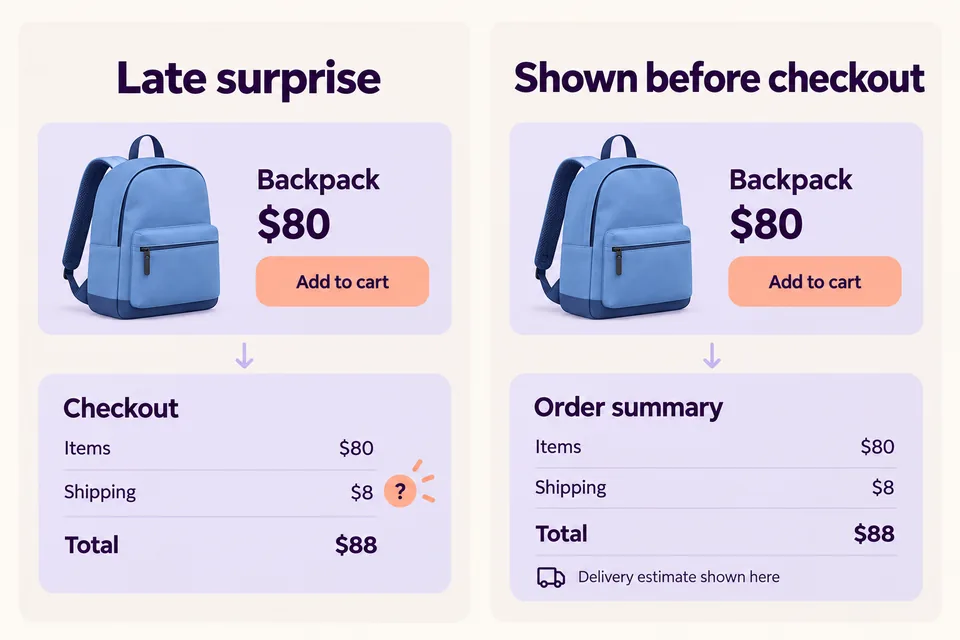
Show the delivery charge or a usable estimate before the final step. If an address is needed, explain that dependency and make the estimate available once the necessary location is known. Label an estimate as an estimate. Show the actual available delivery options and final total before payment.
A notice saying “Delivery calculated after postcode” is more honest than implying free shipping. A countdown or a free-shipping bar does not replace the store’s shipping rules. If you are considering a free-delivery threshold, use the guide to calculating a profitable WooCommerce free shipping threshold before changing your offer.
Baymard Institute’s The Checkout UX Guide, consulted October 29, 2026, recommends early cost visibility and manageable checkout effort. Treat that as a usability direction, not a forecast of how much revenue your store will recover.
3. Make buying without an account an obvious option
WooCommerce already provides a guest-checkout setting under WooCommerce → Settings → Accounts & Privacy. You do not need a field editor simply to enable it. Check whether your particular purchase flow has an account requirement, especially when subscription products are involved.
Then inspect the actual storefront while logged out. A technically enabled guest path can still be hard to understand if the page opens with a dominant sign-in form. Tell people whether they can buy without registering, and let existing customers find sign-in without turning it into a compulsory detour.
Test with an email address that already belongs to a customer account as well as a new one. Watch for a theme or extension that unexpectedly forces a password reset. Configuration and the experience a shopper sees must agree.
4. Remove unnecessary work, not information the order needs
A company-name field on every consumer purchase can create hesitation. Removing a delivery address from a physical-product order creates a different problem. For each field, ask what operational task it supports and whether it is needed for this purchase.
- Distinguish required and optional information clearly.
- Explain unusual requests, such as a telephone number needed by a carrier.
- Use specific error messages that tell the shopper how to correct the input.
- Check that a validation error preserves the information already entered.
HookSpark Checkout Customizer can help with supported checkout-field changes. Verify the current edition and the documented support for your classic or block checkout before choosing a configuration. Our guide to removing unnecessary WooCommerce checkout fields covers the implementation. Adding or hiding a field does not fix a payment failure.
5. Let shoppers verify exactly what they added
“Added” is not enough when the customer needs a blue backpack rather than a black one. Make the product, selected options, quantity and price easy to check. Provide a clear route to review the cart or continue to checkout.
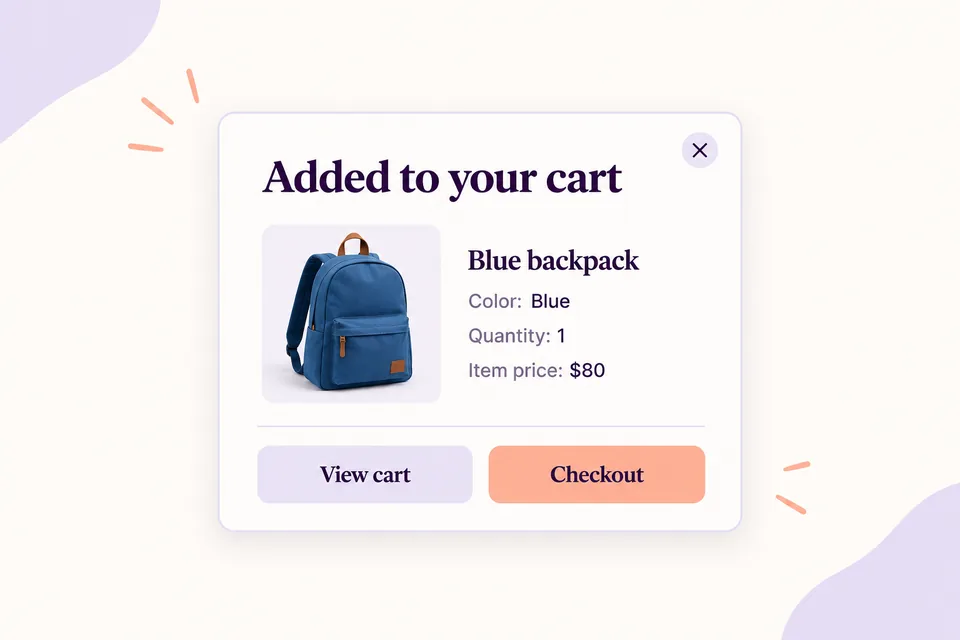
Nielsen Norman Group’s Page Laubheimer explains this in Adding an Item to a Shopping Cart: Provide Clear, Persistent Feedback (June 17, 2018): confirmation should expose the selected item and remain available long enough to inspect it. That is evidence about feedback design, not proof that a particular cart plugin increases conversion.
HookSpark Side Cart offers cart-review interfaces within its documented scope. Choose a presentation that fits the shop rather than assuming a popup is always better. The WooCommerce add-to-cart popup tutorial explains that specific setup and its distinction from a drawer.
For conditional explanations, HookSpark Cart Notices & Checkout Messages can show supported cart messages. A notice informs the customer; it does not change the shipping charge, validate a gateway or send a recovery email. See how to show useful WooCommerce cart notices for that separate task.
6. Test the failed purchase, not only the successful one
Use a staging store and the gateway’s supported test environment. Test a successful payment, a declined payment and any supported authentication challenge. Check mobile behavior, the resulting order status, the message shown to the shopper and whether retrying is understandable.
If payment requires an external authorization screen, inspect the return to the shop. If a method is unavailable for a country, currency or order type, do not advertise it as universally available. Correct the gateway or integration problem rather than disguising it with a reassuring notice.
Keep add-to-cart confirmation separate from payment confirmation. An item in the cart, an order created and an order paid are three different states. A payment error must not be presented as a completed purchase.
Does WooCommerce send abandoned-cart emails without a plugin?
The answer depends on the version. WooCommerce’s official Abandoned cart recovery emails documentation, checked October 29, 2026, describes this distinction:
| WooCommerce version | Core capability |
|---|---|
| 11.0 and 11.1 | Experimental, default-off reminder for eligible orders with an email address; one message per order, not a complete cart-recovery campaign. |
| 11.2 and later | The experimental core feature was removed. Use a suitable extension or service for automated recovery. |
Do not build a new recovery strategy around an experiment removed in later versions. The HookSpark products discussed above address parts of the storefront experience; they are not presented here as abandoned-cart email tools.
A recovery system also needs an eligible contact and a reliable way back to the intended purchase. Coordinate existing senders so someone who has already paid is not chased by a second automation. Review exclusions, opt-outs, delivery and attribution in the tool you actually use. An anonymous cart with no captured contact cannot simply receive an email.
7. Measure completion before celebrating a redesign
Google Analytics documents ecommerce events including add_to_cart, begin_checkout and purchase. Your measurement integration must implement them correctly; installing WooCommerce alone does not establish that your Analytics reports contain those events. Verify a test journey, transaction IDs and duplicate-purchase handling before interpreting the funnel.
For an illustrative cohort, suppose 200 tracked sessions start checkout and 70 of those sessions record a purchase within the defined observation window. That is a 35% checkout-completion rate for that cohort. The remaining 65% is not automatically lost revenue: some people may buy later, and untracked journeys or duplicate events can distort the result.
Use the same session definition, time window and segment in both comparisons. Record the change date and note concurrent promotions, traffic shifts and shipping-price changes. With sufficient traffic, a controlled test is more informative than changing five things and crediting the last one.
A practical order of work for this week
- Check that measurement reflects real checkout starts and paid purchases.
- Run the main mobile purchase route as a guest.
- Write down the first surprising cost, unclear request or broken interaction.
- Fix that specific issue and test the whole journey again.
- Evaluate completion by segment before adding another incentive or recovery flow.
For an earlier-stage audit, use the WooCommerce product page checklist. This article focuses on the journey from cart to purchase; that checklist deals with what people need to decide whether to buy.
Questions about WooCommerce cart abandonment
Should every recovery email include a discount?
No. An incentive does not explain an unexpected delivery cost or repair a failed payment. Identify the reason first and consider the effect on margin before offering a discount.
Is guest checkout enough to prevent abandonment?
No. It removes one possible obstacle for eligible purchases. Costs, information, product choices and payment still need to work together.
Does a lower abandonment rate prove that the redesign worked?
Not by itself. Check sample size, tracking quality, customer mix and concurrent changes. Usability research helps you choose what to test; your store’s data is needed to evaluate the result.
Fix the next obstacle your customer encounters
Choose one observed problem. Use native WooCommerce settings where they solve it, and add a tool only for the missing capability. If checkout fields are the obstacle, explore HookSpark Checkout Customizer and check the supported scope before testing the change in your store.