

Need to prevent customers from placing a WooCommerce order below $50? Create a cart-wide minimum amount rule, choose which charges count toward it, and test the exact threshold before enabling it.
This guide uses the free HookSpark Min/Max Quantities plugin. Our example requires at least $50 in product value after pricing adjustments and coupons, excluding taxes, shipping and fees. A $50 qualifying cart meets this rule; a $40 cart does not.
First, choose the minimum you actually need
Three settings can sound similar while doing different jobs:
| Your requirement | What it controls | Example |
|---|---|---|
| Minimum order amount | Whether the qualifying purchase value is high enough | At least $50 across the cart |
| Minimum product quantity | How many units of a product the buyer must purchase | At least six mugs |
| Free shipping threshold | When a particular shipping method becomes available | Free shipping above a configured threshold |
If you need customers to buy a certain number of items, follow our guide to setting a minimum quantity per product. If you need complete packs, see selling products in packs of six. Neither requirement is the same as spending $50.
WooCommerce’s official Free Shipping documentation describes a minimum amount for making that shipping method available. Its Managing Coupons documentation describes a minimum spend for using a coupon. Those settings apply to the shipping method or coupon; they do not create the cart-wide purchase restriction covered here.
Set up a $50 minimum order amount
For the full setting reference, see the Min/Max minimum and maximum spend guide.
Start in your staging store with WooCommerce and HookSpark Min/Max active. These settings are based on the Min/Max 0.12.2 rule editor. The plugin is standalone and free: this amount rule does not require a paid upgrade.
- Open HookSpark → Min/Max, or use Settings on the plugin’s row in the Plugins screen.
- Open the Minimum order amount setup example. It opens an editable, inactive rule; opening an example does not save or activate it. The example starts at 100 in your store currency, so change it for your store.
- Give the rule a recognizable name, such as Minimum product spend. Set What does this rule count? to All cart items, combined.
- Under What do you want to limit?, choose Purchase amount. Enter 50.00 in Minimum amount and leave Maximum amount empty. Use your shop’s currency; entering 50.00 does not change an EUR store into a USD store.
- Set Product amount basis to After pricing and coupons. Leave Include taxes, Include shipping (entire cart only) and Include fees (entire cart only) unchecked for this example.
- Review the explanation, enable Enable this rule and choose Save rule in staging. Confirm that the saved rule is Active, then run the checks below before using it on the live store.
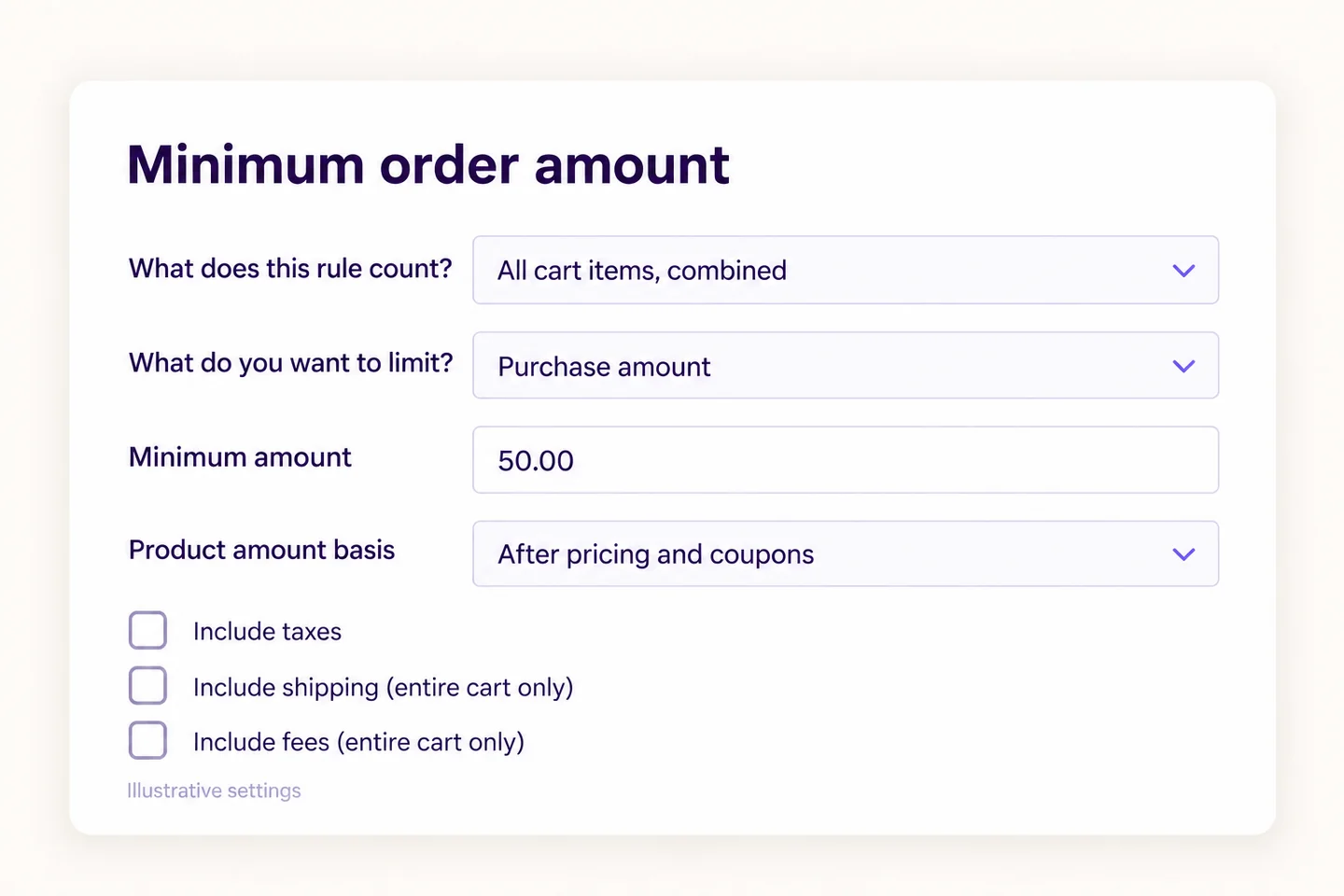
Leaving the maximum empty means there is no maximum amount in this rule. Do not enter zero as a placeholder: zero is an explicit monetary limit. Also check existing rules and customer targeting. Another applicable quantity or amount rule can still prevent checkout.
What happens to a real cart?
Use two ordinary products for a simple test: a ceramic mug priced at $10 and a small plate priced at $15. Both are in stock, have no additional product options, and use those prices before tax. Start without coupons or other price adjustments.
| Cart | Qualifying product value | Expected result for this rule |
|---|---|---|
| Four mugs | $40 | Below the minimum |
| Five mugs | $50 | Meets the minimum exactly |
| Four mugs and one plate | $55 | Meets the minimum |
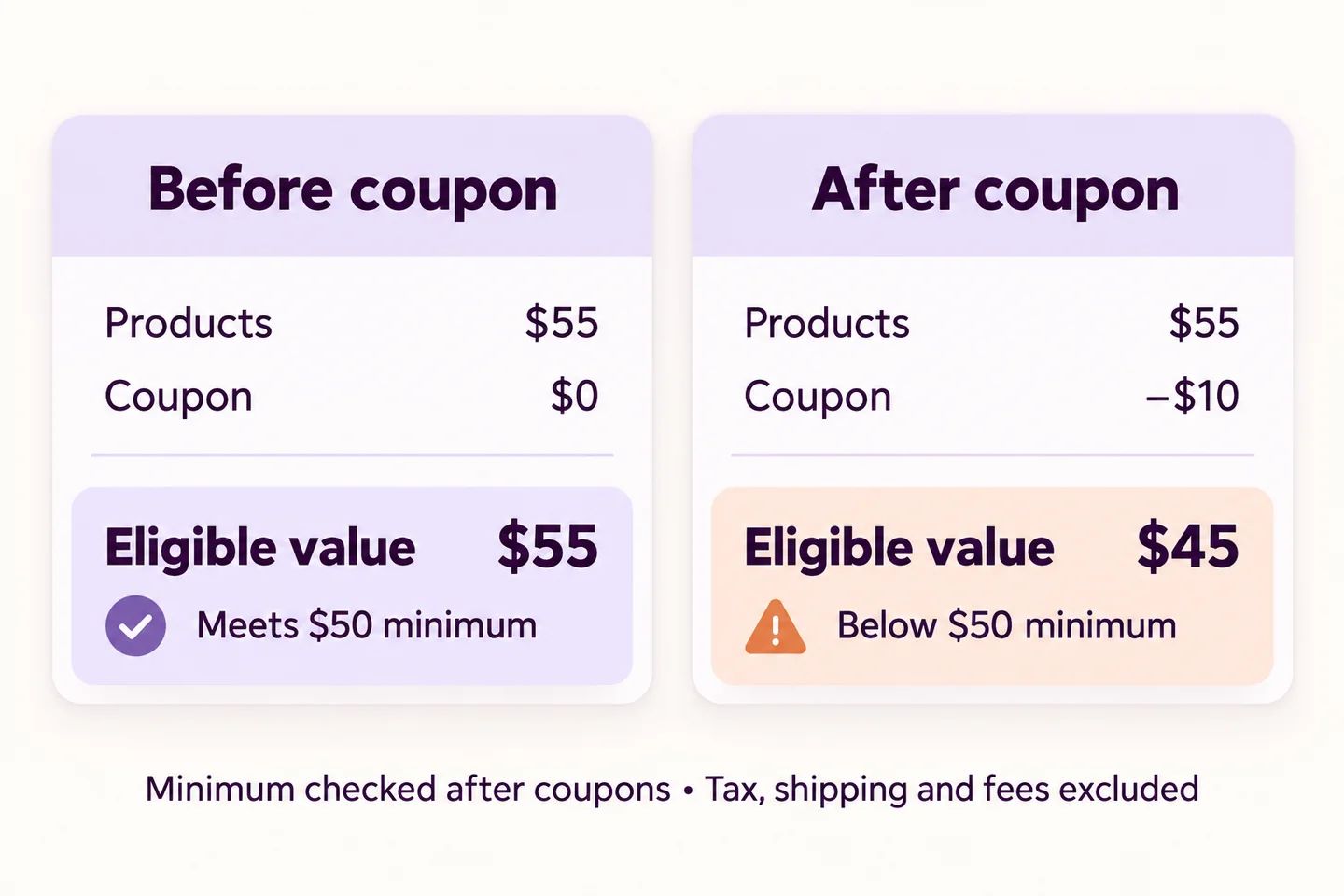
| Four mugs and one plate, with a valid $10 fixed-cart coupon | $45 | Below the minimum after the coupon |
| Add one more mug to that discounted cart | $55: $65 minus $10 | Meets the minimum again |
Min/Max checks the calculated amount; it does not raise the price or add a fee to reach $50. Shipping or tax may make the customer’s payable total exceed $50 while the qualifying product value remains below it. That is expected with the settings we chose.
Should coupons reduce the amount that counts?
Choose the policy you intend to enforce, then explain it consistently:
- After pricing and coupons: the $55 product cart with a $10 coupon counts as $45.
- After pricing, before coupons: that cart counts as $55 before the coupon reduction. Product pricing adjustments still affect this basis.
The editor also offers Before HS Pricing and coupons for the supported HookSpark Pricing calculation. It is not a promise to reconstruct prices from every third-party discount plugin. If another pricing tool changes your cart, test that combination separately.
If you also offer quantity-based discounts, check the amount after those discounts as well. A quantity discount can change whether an amount threshold is met; buying more units does not guarantee that a discounted cart qualifies.
Explain the restriction before it becomes a surprise
State the policy where customers can reasonably find it, including what counts toward the minimum. “Minimum $50 product spend after discounts, excluding shipping and tax” explains more than “Minimum order $50” when shipping appears in the total.
Jakob Nielsen’s 10 Usability Heuristics for User Interface Design, published by Nielsen Norman Group in 1994 and last reviewed in January 2024, recommends errors that explain the problem and offer a way to recover. Applied here, that means making the unmet purchase rule clear and letting the shopper correct their cart. This is a design principle, not evidence that a minimum order increases sales.
Keep the rule name readable because it can appear in the built-in customer feedback. Min/Max also supports custom amount messages; use supported placeholders from the editor and preview them before saving. Do not write a static “add $10” message that becomes incorrect after the customer changes the cart.
Check these cases before enabling the rule live
- Below, exactly at and above $50: confirm the cart feedback and checkout result match the chosen basis.
- Coupon application and removal: the qualifying amount should update and the customer should be able to recover by changing the cart.
- Tax, shipping and fees: confirm the three excluded charges do not silently help the cart qualify. Check both tax-inclusive display settings and the calculated product amount.
- Guest and signed-in customer: confirm the rule applies to your intended audience. Check any role, user or product exclusions already configured.
- Your actual checkout: test the classic or block checkout you use, along with your theme, payment gateway and other cart extensions. A supported amount calculation does not certify every possible extension combination.
If the result is wrong, disable the affected rule while you correct it. Review the calculation basis, currency, targeting and overlapping rules, then repeat the test. Saving a rule is not proof that your complete purchase journey has been checked.
Frequently asked questions
Can I set a minimum order amount without writing code?
Yes. HookSpark Min/Max provides an amount rule in its editor. Choose the cart-wide scope, set the amount and calculation basis, and test it in your store before enabling it live.
Does the minimum include shipping and tax?
Only if you configure the rule to include them. This guide excludes both. If you include shipping, the rule needs a calculated shipping amount; the customer may need to provide their address before it can be checked.
Why is my $55 cart blocked after applying a coupon?
With a minimum of $50 and an after-coupon basis, a $10 coupon makes the qualifying value $45. Add enough qualifying product value, remove the coupon, or change the policy if you intend the minimum to be assessed before coupons.
Does reaching $50 guarantee that checkout will succeed?
No. It satisfies this minimum amount rule. Stock, required options, other purchase rules and the checkout’s own validation still apply.
Can this rule also give customers free shipping?
It enforces the purchase minimum. Configure free shipping separately in WooCommerce’s shipping settings and test both policies together; they can have different thresholds and calculation bases.
To show the amount remaining toward a supported native free-shipping method, follow the WooCommerce free-shipping progress bar tutorial. That Premium Side Cart feature reports shipping eligibility; it does not enforce this purchase minimum.
Set a minimum customers can understand
Choose the right amount basis, make the policy clear and test a customer’s path from an invalid cart to a valid one.
Explore free HookSpark Min/Max Quantities →