
Min/Max · Development 0.12.0 · Updated 13 September 2026
Set a minimum or maximum spend
Require an eligible order value of 100.00, or cap it at a maximum. These rules validate an amount; they never change a price or apply a discount.
Create a minimum of 100.00
- Go to HookSpark → Min/Max and create a rule named “Minimum order value”.
- Choose the whole-cart scope, then change the purchase metric from quantity to Purchase amount (“Importo di acquisto”). For a single product or selected catalog group, choose that scope instead.
- Enter 100.00 in Minimum amount. Leave Maximum amount blank unless you need a cap.
- Choose After discounts and leave taxes, shipping and fees unchecked for this example.
- Review customer targeting, enable the rule and save. Reopen it to confirm the saved values.
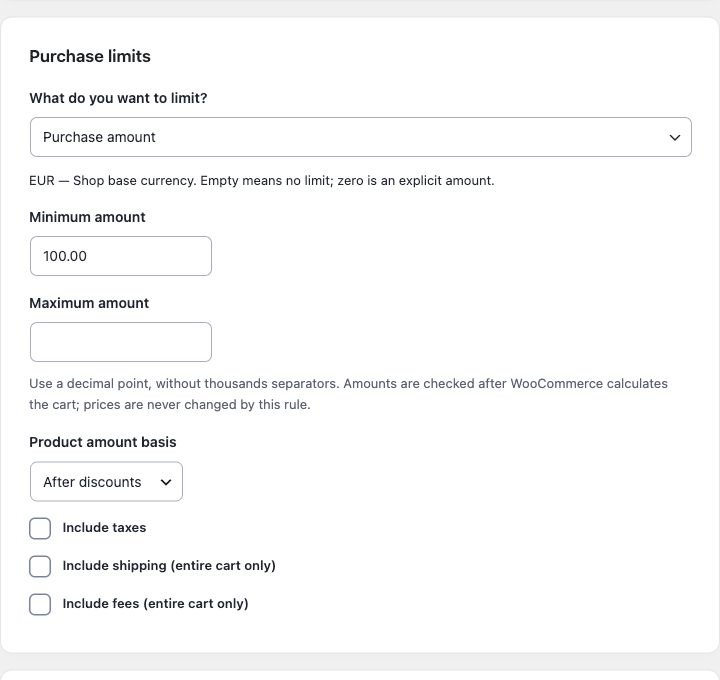
Choose what counts
| Setting | Effect |
|---|---|
| Before discounts | Uses the WooCommerce product subtotal before coupon discounts. |
| After discounts | Uses the product total after discounts. |
| Include taxes | Adds the relevant calculated taxes. |
| Include shipping / fees | Adds the corresponding cart charges. Available only for a whole-cart amount rule. |
With these extras excluded, the checked value can differ from the grand total visible in checkout. Shipping and taxes can change with the address and method; test after WooCommerce recalculates.
Test the arithmetic
Example: eligible products subtotal 120.00, coupon discount 30.00, taxes/shipping/fees excluded. A minimum of 100.00 passes before discounts because 120.00 ≥ 100.00. It fails after discounts because 90.00 < 100.00. Exactly 100.00 is allowed. A maximum of 200.00 allows exactly 200.00 but rejects 200.01 in a two-decimal currency.
Use a test coupon and test checkout to verify both cases. Amount validation runs after cart calculation, so do not expect a product quantity input alone to prove the order passes.
Input errors and currency changes
Use non-negative numbers with a decimal point and no thousands separator: 1000.50, not 1,000.50. Do not exceed the shop’s decimal precision. Empty means no threshold; zero is an explicit amount. Minimum cannot exceed maximum.
The rule stores the base currency and precision. If either changes, review and resave affected rules; do not treat an old 100 EUR threshold as 100 USD. Multi-currency conversion is not a declared integration.
Combine with quantity restrictions
Use separate quantity and amount rules when both conditions are required. Both must pass. Product/category/tag exclusions change eligible product totals; see counting and exclusions.