

To limit quantity per product in WooCommerce to a maximum of three units per order, create an individual product rule in HookSpark Min/Max Quantities, select the product and set Maximum pieces to 3. Leave the minimum and pack size empty if shoppers should be able to buy one, two or three units.
This walkthrough uses a simple Limited-edition ceramic mug. The cap applies to that product’s quantity in the current cart and order. It is not a lifetime limit per customer, a stock reservation or a limit on all products combined. These quantity rules are available in the free plugin.
Choose the limit that matches your store policy
A product cap is useful when you want to restrict how many pieces of a scarce item can go into one order. For example, you have 30 mugs available but allow up to three per order. You keep the real inventory at 30; the purchase cap is a separate rule.
| Your requirement | Approach |
|---|---|
| Only one unit of a simple product per order | WooCommerce’s native Sold individually setting |
| Up to three units of one product per order | Individual product rule with Maximum pieces 3 |
| At least six units of one product | A minimum quantity rule |
| A maximum across all cart items | A combined cart rule, outside this walkthrough |
| Three units per customer across multiple orders | Requires purchase-history enforcement; this rule does not provide it |
If you need a one-unit cap for a simple product, check Products → Edit product → Product data → Inventory → Sold individually. WooCommerce documents this native setting in its Product Editor settings guide. You do not need a three-unit rule to solve a one-unit requirement.
For the opposite requirement, follow our guide to minimum order quantity per product. A minimum order amount concerns money spent in the cart, rather than a maximum number of mugs.
1. Prepare the product
Install and activate HookSpark Min/Max Quantities, then use a published simple product named Limited-edition ceramic mug. For a controlled test, give it a regular price of $20, sufficient stock and no other quantity rule.
- Leave Sold individually off for this example; otherwise the native one-unit restriction prevents a three-unit purchase.
- If stock management is enabled, keep the actual stock quantity. Do not change it to three merely to imitate a per-order cap.
- Make sure the product is purchasable and in stock. A maximum does not override stock availability.
Add clear store wording such as “Maximum 3 mugs per order” to the product description near the purchase information. This is an explanation you add to the store; the walkthrough does not assume the plugin writes that description automatically.
2. Save a maximum quantity rule for this product
Open HookSpark → Min/Max in the WordPress admin and create a rule. The quantity rule setup guide explains the editor if this is your first configuration.
- Enter a descriptive Rule name, such as Mug: maximum 3 per order.
- For What does this rule count?, select One product or each variation.
- Under Product (for an individual rule), select the published Limited-edition ceramic mug.
- For What do you want to limit?, choose Number of pieces.
- Set Maximum pieces to 3.
- Leave Minimum pieces, Pack size and Starting quantity empty. Empty means no additional constraint; Starting quantity is a suggestion, not the cap.
- Keep the intended audience broad if the rule should apply to all customers, and check that the mug is not exempt or excluded.
- Turn on Enable this rule, save it and reopen it to confirm the target and saved maximum.
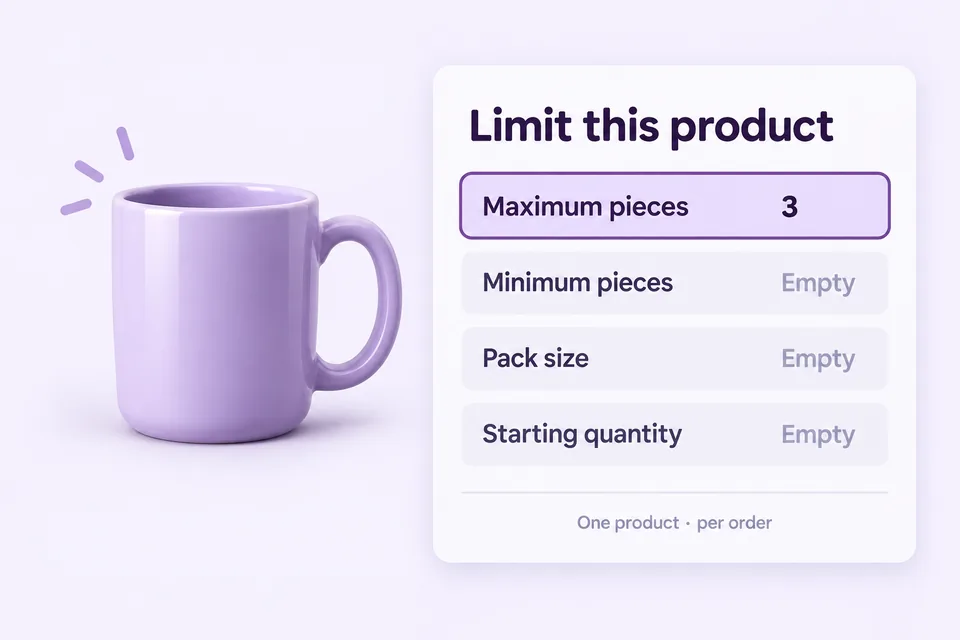
The unsaved editor preview helps explain the draft, but changes affect purchases only after you save. A disabled rule remains editable and does not enforce the purchase limit.
3. Test valid quantities, rejection and recovery
Open the mug product page in a fresh shopper session. With this rule alone and sufficient stock, one, two and three mugs are allowed. A request for four exceeds the cap.
| Attempt | Expected result |
|---|---|
| Add 1, 2 or 3 mugs to an empty cart | Allowed by this quantity rule |
| Request 4 mugs | Rejected as above the maximum |
| Already have 2 mugs, add 1 more | Total 3: allowed |
| Already have 2 mugs, add 2 more | Total 4: rejected; adding again is not a new allowance |
| Change a cart quantity from 3 to 4 | Must not permit an over-limit purchase |
| Keep 3 mugs and add an unrelated product | The unrelated product is outside this individual rule |
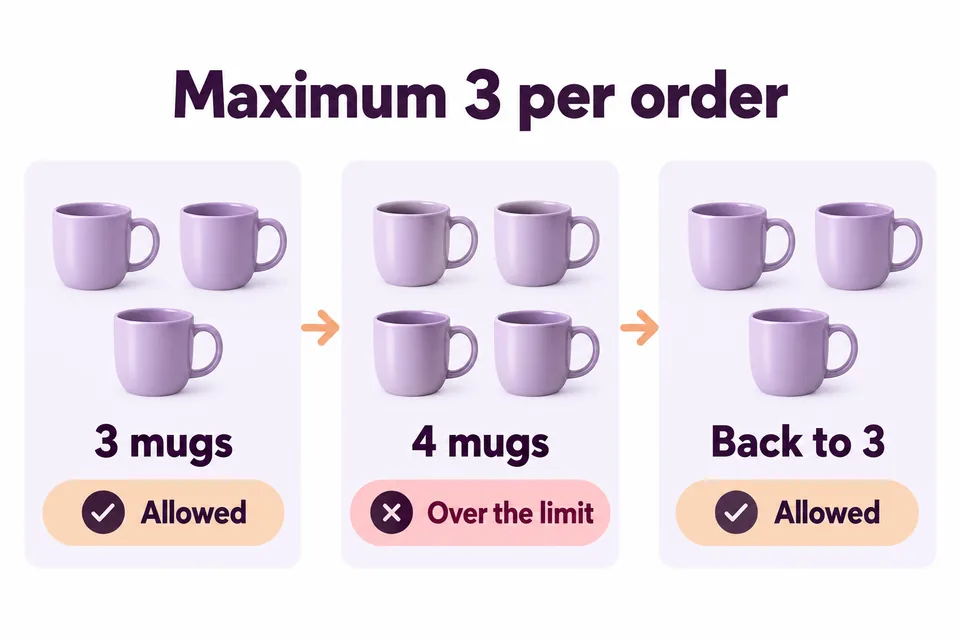
Check the accepted cart quantity after a rejected action; do not judge the result only by the number typed into a control. Correct the requested quantity to three or fewer and retry. Also check removing the item entirely, rather than forcing a customer to keep one.
Run these tests through the cart and checkout used by your store, including the Cart Block if applicable. Theme controls can prevent entering four in the browser, so also verify the store’s server-side rejection rather than relying solely on an input’s maximum attribute.
Complete a test order using a test payment method and inspect the recorded product quantity. A product-page preview alone does not establish that your store’s checkout, payment and fulfilment integrations work together.
Explain the restriction before it interrupts a purchase
Tell shoppers which product is limited and that the restriction applies per order. If they exceed it, the explanation should identify the cap and the quantity they can use next. Avoid vague wording such as “Invalid cart”.
Tim Neusesser and Evan Sunwall, “Error-Message Guidelines,” Nielsen Norman Group, May 14, 2023, recommend precise, understandable feedback and constructive recovery advice. Our application here is to state the three-mug cap before purchase and make the correction clear. This usability guidance does not establish a conversion uplift for quantity limits or for HookSpark.
Why is the quantity limit not behaving as expected?
- The rule is disabled or unsaved: enable it, save and reopen the saved configuration.
- The wrong product is selected: check the exact target rather than a similarly named item.
- The buyer is outside the audience: test guests and logged-in customers against your audience settings.
- The product is exempt or excluded: inspect the saved exclusions.
- Only one unit can be purchased: check Sold individually and actual available stock.
- The store permits only pack quantities: inspect Pack size and other applicable rules. A cap of three does not itself require packs of three.
- An older cart contains too many units: recheck the cart and checkout after changing a rule. Do not assume existing quantities were silently reduced.
Start with one rule, verify it, then reintroduce other quantity rules or integrations. Independent rules can overlap; a saved maximum of three is not permission to ignore a stricter applicable constraint.
What changes for a variable product?
The editor’s One product or each variation scope is deliberately explicit. Selecting a variable parent applies its individual rule separately to each variation. Do not assume that a maximum of three on that parent means three units summed across every color or size.
If your policy is three units across a product’s variations together, you need a combined selection for that parent and its variations. Configure and test that separate scenario before publishing the wording. The simple mug example above avoids this ambiguity.
Frequently asked questions
Can I limit WooCommerce product quantity without a plugin?
For one unit of a simple product per order, use the native Sold individually setting. For a configurable cap such as three, this walkthrough uses the free HookSpark Min/Max Quantities plugin.
Does the maximum reset when customers add the product again?
No. Repeated additions contribute to the product quantity in the current cart. Two mugs already in the cart plus another two would exceed a maximum of three.
Is this a maximum quantity per customer?
It is a maximum for the product in the current cart and order. It does not count that customer’s earlier orders or stop them placing another order. Do not describe it as a lifetime or daily customer allowance.
Does Maximum pieces 3 mean customers must buy three?
No. With Minimum pieces and Pack size empty, one, two or three units meet this rule. A minimum and a pack increment impose different conditions.
If customers must buy whole boxes rather than one, two or three individual units, follow the WooCommerce packs-of-six tutorial. Its minimum, maximum and multiple form a different buying rule.
Set a clear product cap and test the boundary.
Select one product, set Maximum pieces to three and verify a valid purchase, an over-limit request and recovery. Keep the customer-facing wording specific to a single order.
Explore free Min/Max Quantities →