

A customer adds a product with a 20% automatic promotion, then enters a 10% coupon. What should happen: keep both discounts, suspend the promotion, or apply the coupon only to other products? Decide this before advertising the offer. Coupon settings and automatic pricing rules are different controls.
This tutorial uses HookSpark Dynamic Pricing & Discount Rules and its publicly distributed version 1.0.4. The example amounts are product-only values in US dollars, before tax and shipping. They illustrate the calculation, not a promised selling price or margin.
What WooCommerce already controls
Native coupons have restrictions. “Individual use only” prevents combination with other coupons; it is not a universal switch against automatic pricing. “Exclude sale items” concerns sale eligibility. Do not assume every runtime price adjustment is a native sale price. Source: WooCommerce Managing Coupons documentation, consulted 28 October 2026.
In our isolated test, a native 10% coupon with individual use enabled still combined with the supported pricing rule. A product adjusted at runtime also did not become a native sale item solely because of that adjustment. Test your actual engine instead of relying on the wording of an unrelated checkbox.
Why 20% plus 10% can result in 28% off
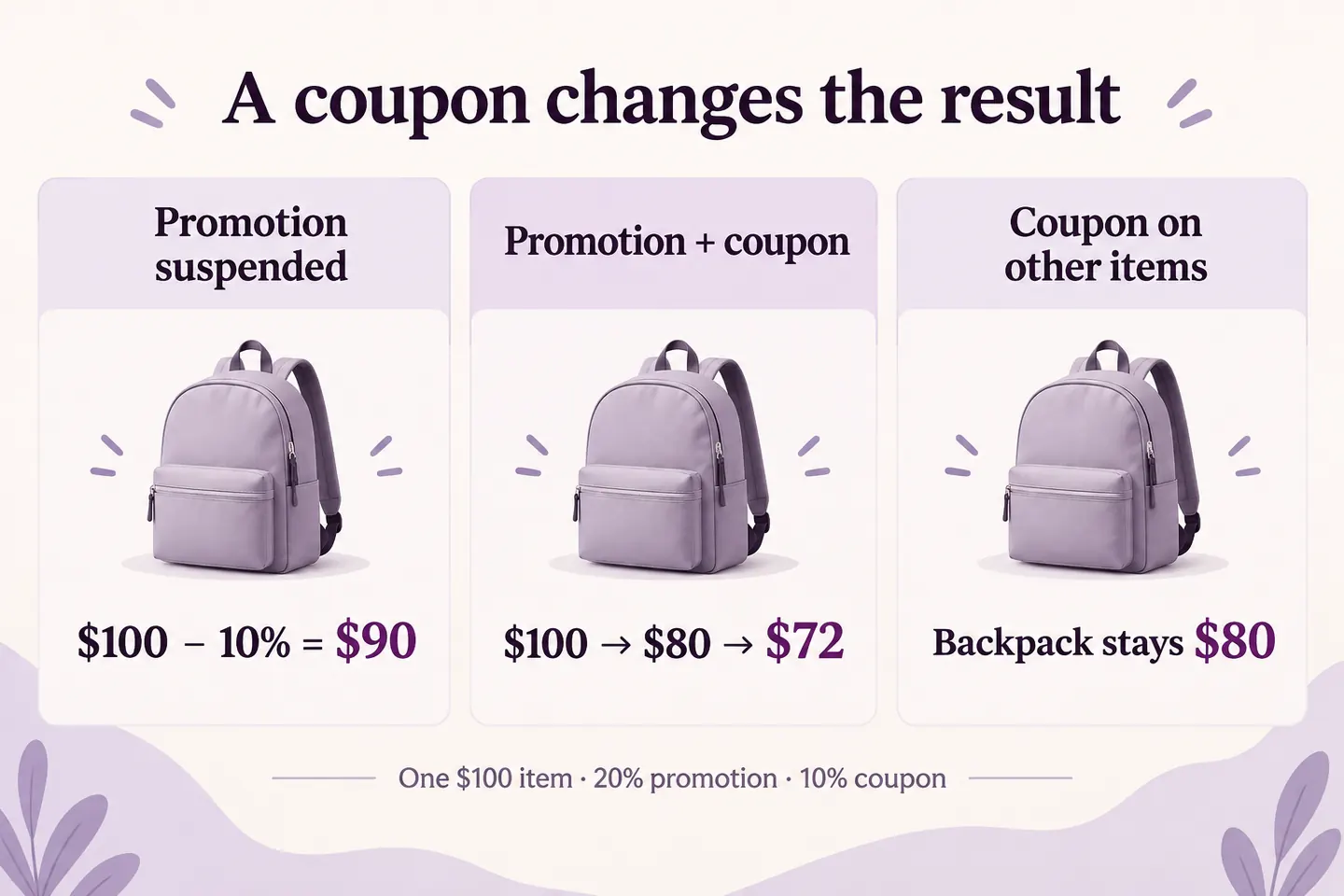
Use one regular-price product costing 100 and a promotion reducing it by 20%. Its adjusted price is 80. A subsequent 10% coupon removes 8 from that adjusted amount, leaving 72. You have reduced the original 100 by 28, not 30. The order and eligible base of the calculations matter.
Choose the coupon policy on the promotion
Open the HookSpark promotion editor and find If a coupon is present. The public package offers the following alternatives. The totals below assume one eligible 100 product, a 20% pricing rule and one otherwise valid 10% coupon.
| Policy | What happens in this example | Product total |
|---|---|---|
| Suspend this promotion | The promotion steps aside; the native coupon discounts the regular price | 90 |
| Apply promotion, then native coupons | The rule reduces 100 to 80; the coupon then removes 8 | 72 |
| Coupons on other lines only | The promoted item keeps its rule price; the coupon needs other eligible lines | 80 for this item |
The third policy is labelled for WooCommerce 8.8 and later. This example was tested on WooCommerce 11.1. These policies do not override coupon validity, expiry, spending restrictions or product exclusions. A coupon also does not make an otherwise ineligible promotion apply.
Set up a controlled example first
- Use an isolated test store. Choose one regular-price product at 100, quantity one, with no other promotions.
- Create or isolate a 20% product pricing rule limited to that product. Keep unrelated conditions out of this first test.
- Create a native percentage coupon for 10 with no conflicting product or spending restrictions.
- Save the intended coupon policy on the promotion.
- Check the product total without the coupon: 80 in all three cases here. Apply the coupon and compare the result with the table.
Without the pricing extension, native coupon restrictions may be sufficient for your coupon-only campaign. Use the additional policy when you need to coordinate a supported automatic promotion with the coupon calculation.
Apply the coupon only to other cart lines
Add a 40 cap that is outside the product promotion. With the other-lines policy, the backpack stays at 80. The coupon reduces the cap from 40 to 36. The product total is 116. Applying 10% to the entire already-adjusted 120 would instead give 108, which is a different offer.
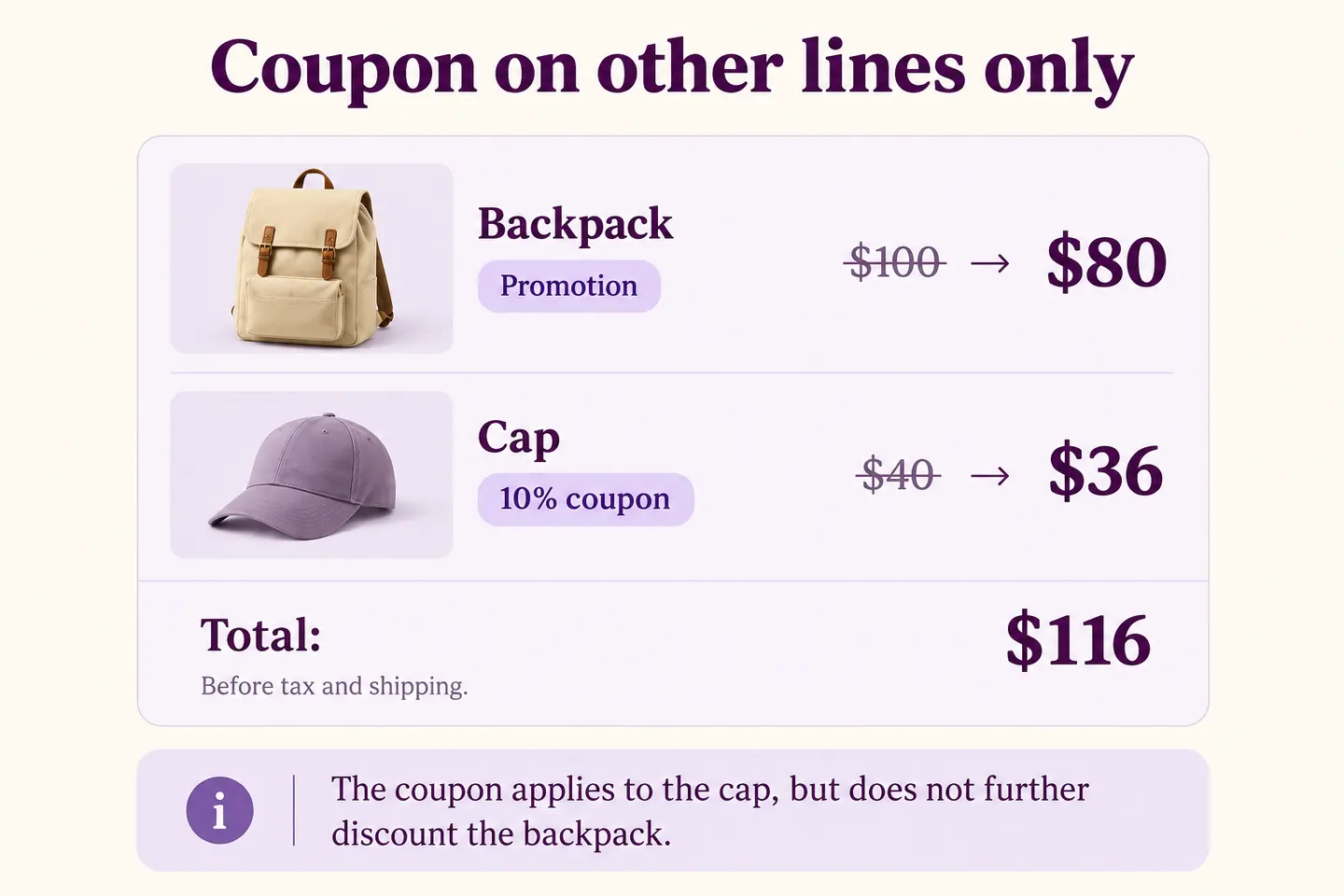
We verified the 116 total with the native WooCommerce cart and the public HookSpark package. It does not predict every tax, shipping, fee or third-party pricing combination.
Check the offer before sharing the code
Repeat the test with the coupon removed, a non-promoted product and a cart that fails the coupon’s restrictions. Then verify your actual tax basis, rounding, destination and checkout flow. Review other enabled promotions so that you know which rule produced the price. A saved policy is not proof that every cart qualifies.
For the underlying quantity offer, use the WooCommerce bulk discount tutorial. For campaign examples, use the Black Friday offer setup guide. This article owns the coupon-interaction task rather than repeating those setup guides.
Common questions
Does individual use stop an automatic discount?
Do not assume so. It controls coupon combinations. In the tested HookSpark combination, the pricing rule still ran before that coupon.
Is sequential 20% and 10% the same as 30% off?
No. In the 100 example, the result is 72: an effective reduction of 28.
Will a coupon apply to every other product?
Only if the other products also meet the native coupon’s eligibility rules.
Choose the total you intend to offer, save the matching policy and verify that total with a representative cart before launching the campaign.