
 HS Dynamic Pricing & Discount Rules
for WooCommerce
Create WooCommerce quantity discounts, fixed-price groups and customer-selected rewards. Combine purchase history, recurring schedules and cart conditions, then check the applicable totals before activating your offer.
- Turn bigger baskets into clear offers.Combine quantity discounts, BOGO deals and fixed-price groups such as three products for €100.
- Reward the right customers at the right time.Use registered-customer purchase history, recurring schedules and combined cart conditions.
- Let shoppers choose their reward.Offer selectable gifts or discounted extras that are added only after customer confirmation.
- Check your campaign before activating it.Start with an inactive template and use the simulator; verify fees and customer-selected rewards in the cart.

MADE FOR REAL STORE SCENARIOS
Create WooCommerce discount rules for products and carts.
Set quantity, cart and customer-role discounts, schedule promotions and preview the calculation before enabling a rule.
01 / QUANTITY PRICING
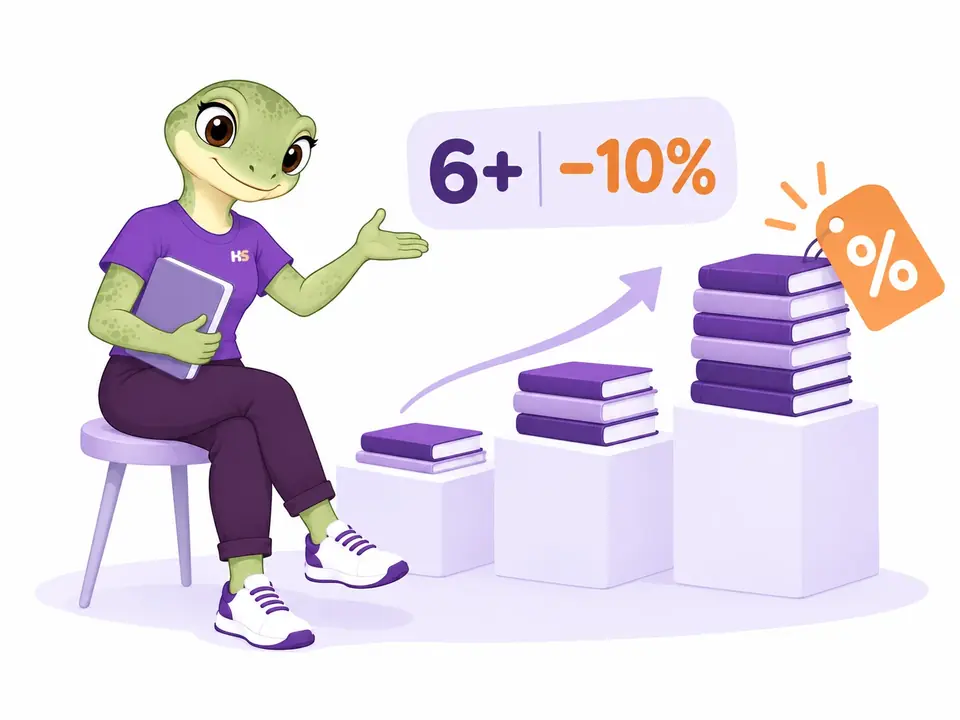
Set bulk discounts and tiered pricing by quantity.
Create quantity bands with a price or discount for each tier. Apply a tier to all eligible units, or discount only the units within a later band.
- Bulk and graduated quantity pricing
- Target products and customers explicitly
02 / CART DISCOUNTS
Apply WooCommerce cart discounts automatically.
Apply a fixed or percentage discount to an eligible cart. For example, a €100 eligible subtotal with a 10% discount becomes €90 before subsequent coupons, taxes and shipping are calculated.
- Choose a fixed amount or percentage reduction
- Set which carts qualify for the discount

03 / CUSTOMER ROLE PRICING
Set WooCommerce role-based pricing for different customers.
Give an existing wholesale role a 10% product discount while retail shoppers keep the regular price. A €20 notebook becomes €18 for the eligible role, before applicable tax and other discounts.
- Include or exclude existing customer roles
- Combine customer targeting with your product selection

04 / BUY MORE, GET MORE
Create BOGO discounts and three-for-two offers.
Create buy-one-get-one offers, three-for-two deals or a second item at half price. Choose whether the offer repeats as eligible quantities grow. Discounts apply to items already in the cart.
- Choose the qualifying and discounted quantities
- Control whether the offer repeats

05 / PREVIEW YOUR OFFER
Preview dynamic pricing before activating discount rules.
Test a saved draft with products, quantities, a customer and a date. Inspect the calculated price and read why each rule applies before activating the promotion.
- See the price and the applied rule
- Try different cart scenarios

06 / TARGETED PRODUCT OFFERS
Schedule product discounts for selected customers.
Apply a percentage discount, a fixed reduction or a target price to selected products. Choose who qualifies and when the promotion starts and ends.
- Product and customer targeting
- Start and end dates in your store timezone

THE PLUGIN IN PRACTICE
See how it works in WooCommerce.
Real examples from the plugin interface. Open an image to inspect the details.
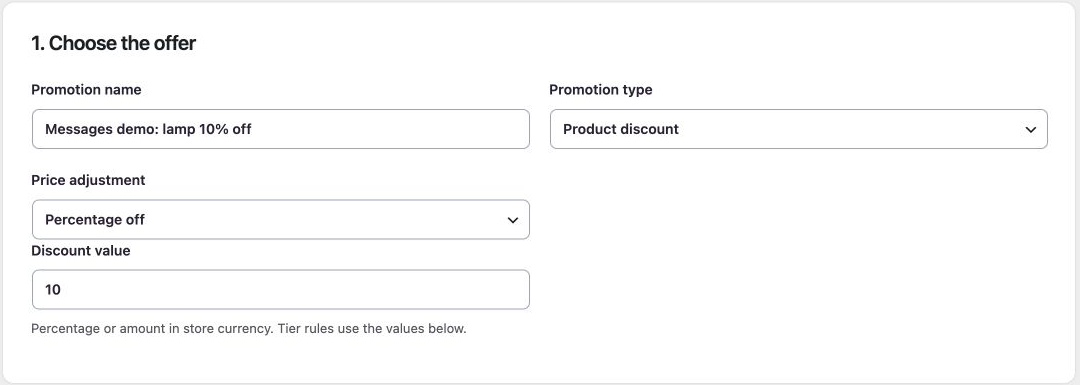
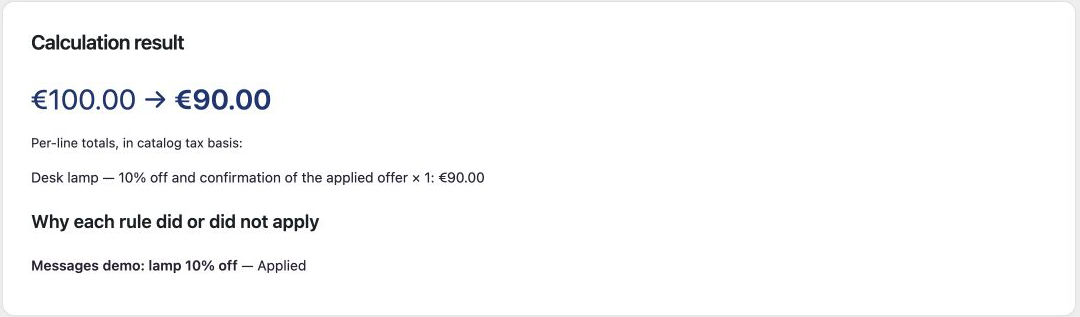
Screenshots show the English interface. Demo products, prices and settings are examples.
LESS IMAGINING. MORE TRYING.
Try WooCommerce discount rules in action.
Shop the offers. Then create your own.
Be the customer.
Add sample products and compare quantity discounts, BOGO offers and cart totals.
Try frontend demoMake it your store.
Edit discount rules, target customer roles and explore the cart simulator.
Try admin demoYour personal admin demo lasts 60 minutes. Use sample details: no real payments or external emails.
ADVANCED PROMOTIONS · INCLUDED FREE
Build the offer around the way your customers shop.
Combine these tools in one standalone Free plugin. Each campaign keeps explicit eligibility and priority rules.
Set offers that return every week
Run a weekend promotion or a daily time window in your shop timezone, within the campaign’s overall dates.
Match weight and delivery destination
Qualify an offer by cart weight, country or postcode when that information is available.
Reward first purchases and returning customers
Use paid-order counts, spending or the latest order for registered customers. History is limited to 500 paid orders per period.
Sell a group at one fixed price
Offer three €40 products for €100. With repetition enabled, further complete groups receive the same offer.
Offer gifts and extras shoppers can choose
Let customers pick an eligible gift or confirm a discounted paid add-on. Paid extras require an explicit choice.
Combine conditions with All / Any
Build groups of supported product, cart and customer conditions instead of creating a separate campaign for every combination.
Follow the selected checkout methods
Apply eligible campaigns when the customer chooses an allowed payment method or shipping service.
Adjust shipping and add separate fees
Reduce available shipping rates or configure fixed and percentage checkout fees. Review taxes and final totals in checkout.
Make promotions easier to discover
Show an absolute-end countdown, share a coupon link or display up to 50 selected simple products. Start with six inactive campaign templates.
Explore advanced promotions and their limits →
Try three products for €100 → · Try a customer-confirmed add-on →
WHAT IS INCLUDED
Included in the Free plugin
Build your offers with the complete Free toolkit.
| What you can do | Free |
|---|---|
| Percentage and fixed product discounts Reduce eligible product prices without changing saved catalog prices. | Included |
| Quantity tiers and bulk pricing Set prices or savings for quantity ranges. | Included |
| BOGO offers Configure buy-one-get-one and three-for-two promotions. | Included |
| Cart discounts Apply a promotion when the cart meets your conditions. | Included |
| Product and variation targeting Choose products, categories and supported variation groupings. | Included |
| Customer roles and campaign dates Control eligibility and when a rule is active. | Included |
| Rule priorities and combinations Choose the order and supported combination behavior. | Included |
| Cart simulator Preview saved rules and drafts; checkout fees and customer choices need a real cart check. | Included |
| Fixed-price groups Offer a complete group at one total, with optional repetition. | Included |
| Customer-selected gifts and discounted add-ons Require an explicit choice before adding a paid reward. | Included |
| Recurring schedules and purchase history Use weekdays, local time windows and registered-customer paid-order history. | Included |
| Combined conditions Nest ALL/ANY groups with supported cart, product and customer facts. | Included |
| Weight, destination and checkout methods Qualify offers using the available cart and selected checkout details. | Included |
| Shipping adjustments and checkout fees Discount eligible rates or configure separate fixed/percentage fees. | Included |
| Promotion display and templates Use countdowns, coupon links, explicit simple-product lists and six inactive drafts. | Included |
| Try it in your staging store | Download Free |
This is a standalone Free plugin. The features above do not require a Premium license. Version 1.0.4 is available on WordPress.org. Read setup, supported behavior and current limits.
HOOKSPARK INTEGRATIONS
Connect discount rules with quantity limits and notices.
Each plugin works independently. Installing them together does not create rules or messages automatically.

Pricing + Min/Max
Offer a discount and keep your purchase limits. Pricing calculates the promotion; Min/Max checks the quantity and order amount.
A three-for-two offer still counts as three units. If your minimum spend is calculated after discounts, the discounted total must still meet it.
Set it up
Configure the promotion in Pricing and the purchase limits in Min/Max. Choose whether the minimum amount is checked before or after discounts.

Pricing + Messages
Confirm a real offer in the cart. A connected message appears only when the selected Pricing rule has actually reduced prices.
Show “Your lamp has received the 10% offer” after the lamp discount applies. The message itself does not create a discount.
Set it up
Create the promotion in Pricing, then select that rule in the message’s HookSpark connections. Configure and enable the message.
Messages connections require compatible versions of both plugins. If a connected provider is inactive or unsupported, its dependent message stays hidden.
Read the Messages connection guide →Compatibility
Selected local checks; open the details for exact versions and limits.
Tested scenarios and limits
Dynamic pricing compatibility and current limits.
Local checks cover simple products and variations, classic and Blocks cart/checkout, HPOS and coexistence with Min/Max.
Subscriptions, bundles, multi-currency, Elementor and other pricing engines are not validated. This is a development preview, not a production compatibility promise.
Read the full compatibility notes →The alpha.5 additions were checked on WordPress 7.1.2, WooCommerce 11.1 and PHP 8.2 with HPOS. Earlier platform checks below do not certify every new feature on the minimum versions. Broader theme, gateway, mixed-tax and legacy-order-storage checks remain open. Read the feature-specific limits.
Platform requirements
- WordPress
- 6.8 minimum · tested through 7.1
- WooCommerce
- 10.6 minimum · tested through 11.1
- PHP
- 8.2 minimum · verified on 8.2.29
Verified combinations: WordPress 6.8 + WooCommerce 10.6.0, and WordPress 7.1 + WooCommerce 11.1.0, on PHP 8.2.29. Follow the WordPress requirement of your installed WooCommerce version. Other PHP branches and every intermediate combination have not been verified.
Astra and WPML: tests of 6 October 2026
Dynamic Pricing 1.0.0 was exercised on WordPress 7.1.2, WooCommerce 11.1.0, PHP 8.2.29, HPOS, Astra Free 4.14.0/Pro 4.13.10, WPML CMS and String Translation 5.1.0, and WooCommerce Multilingual 5.6.2. The Astra price preview updated in the selected scenario, and explicit English and Italian product IDs worked in the lab. A separate 1.0.1 candidate passed targeted WPML matching tests.
The public 1.0.0 package does not inherit an original-only English product target on its Italian translation. The corrected 1.0.1 candidate is awaiting the coordinated release; verify the installed package before relying on that behavior. These selected local checks do not certify every theme module, translated custom field, currency, browser, builder or cache setup.
Elementor Free and Pro: 9 October 2026
Product preview and bulk pricing work in the Free Shortcode path and Pro Single Product Add to Cart, Cart and Menu Cart widgets. Twelve €30 items became €324 with the tested 10% discount; the Pro mini-cart used the discounted unit price.
Clear page and WooCommerce/browser cart-fragment caches after upgrading. This does not qualify every promotion, currency or custom widget.
Checked with Elementor Free 4.3.4 and Pro 4.3.1 on WordPress 7.1.3, WooCommerce 11.1.0 and PHP 8.2.29.
PRODUCT CHANGELOG
Latest updates
Recent development updates. Select a row to read the details.
HS Dynamic Pricing & Discount RulesStable cart prices with currency conversion1.0.5
Release candidate · staging validation pending
Stable cart prices with currency conversion
- Keep promotion prices and savings stable across repeated cart calculations when the store uses the qualified EUR/USD currency adapter.
- Provide a storage-currency hook for explicit integrations without changing catalog prices or historical orders.
HS Dynamic Pricing & Discount RulesElementor Free and Pro: tested WooCommerce pathsTested 1.0.4
Selected local builder checks — see scope and limits
Elementor Free and Pro: tested WooCommerce paths
- Product preview and bulk pricing work in the Free Shortcode path and Pro Single Product Add to Cart, Cart and Menu Cart widgets. Twelve €30 items became €324 with the tested 10% discount; the Pro mini-cart used the discounted unit price.
- Clear page and WooCommerce/browser cart-fragment caches after upgrading. This does not qualify every promotion, currency or custom widget.
- Test stack: Elementor Free 4.3.4 / Pro 4.3.1, WordPress 7.1.3, WooCommerce 11.1.0, PHP 8.2.29, Twenty Twenty-Five.
- All supplied editions include dated compatibility notes inside their ZIP package; the first browser checks were recorded on 9 October and final native checks on 10 October.
HS Dynamic Pricing & Discount RulesWooCommerce product controls in Elementor Pro1.0.4
Builder integration update
WooCommerce product controls in Elementor Pro
- Restore the product pricing preview in Elementor Pro Single Product Add to Cart and discounted unit prices in native mini-cart fragments.
- Clear page and WooCommerce/browser cart-fragment caches after upgrading. This does not qualify every promotion, currency or custom widget.
HS Dynamic Pricing & Discount RulesWPML compatibility: original-product targeting in 1.0.11.0.2
Compatibility documentation update — selected tests and limits apply
WPML compatibility: original-product targeting in 1.0.1
- Selected WPML original-product and translated-variation targets matched correctly in local tests.
- The public 1.0.0 package does not include this correction; package promotion remains pending.
- Package documentation: 1.0.2 includes the dated compatibility note; underlying test versions and limitations are recorded below.
HS Dynamic Pricing & Discount RulesAstra compatibility: selected price-preview checksTested 1.0.2
Compatibility documentation update — selected tests and limits apply
Astra compatibility: selected price-preview checks
- The 1.0.0 price preview updated in the selected Astra product-page scenario.
- This does not establish every Astra layout, dynamic price condition or payment flow.
- Test stack: WordPress 7.1.2, WooCommerce 11.1.0, PHP 8.2.29, HPOS, Astra Free 4.14.0/Pro 4.13.10, WPML CMS/String Translation 5.1.0 and WCML 5.6.2.
- Package documentation: 1.0.2 includes the dated compatibility note; underlying test versions and limitations are recorded below.
WooCommerce discount rules: common questions.
Are these advanced features included for free?
Yes. Recurring schedules, purchase history, fixed-price groups, selected rewards, combined conditions, checkout methods, shipping adjustments, fees and promotion display are included. No Premium license is required.
Does BOGO add a free product automatically?
Same-selection BOGO discounts items already in the cart. A separate Buy A / get B campaign can add an eligible free gift automatically, or offer a choice. Paid add-ons always require customer confirmation.
Can I see the new offers in the demo?
Yes. Try the three-for-€100 group or add two gift-wrap sets and explicitly choose the half-price ribbon in the cart. A personal admin demo includes 15 sample campaigns and lasts 60 minutes.
Do catalog prices change?
No. Promotions adjust cart lines and preserve saved catalog prices. Orders record applied promotions.
Can I combine discounts and coupons?
Yes. Choose the supported combination strategy. Campaign coupon links use native WooCommerce validation against the current cart; they do not reserve a coupon for a later qualifying purchase.
Does the simulator include every checkout effect?
No. Use it to inspect supported price rules and conditions. Checkout fees and customer-selected rewards require a real cart check; the simulator cannot invent the shopper’s choice.
What are the main limits?
Purchase history requires a registered customer and supports up to 500 paid orders per period. Promotional lists support up to 50 explicitly selected simple products. Countdowns follow an absolute campaign end, not each recurring daily window.
Is this ready for every production store?
The download is a development preview for staging. Broader theme, payment gateway, mixed-tax and minimum-version checks remain open for the new additions. Multi-currency, subscriptions and third-party bundles are not certified. Test your own setup before use.
What was tested with Astra and WPML?
Selected local scenarios were run on WordPress 7.1.2, WooCommerce 11.1.0, PHP 8.2.29, HPOS, Astra Free 4.14.0/Pro 4.13.10, WPML CMS and String Translation 5.1.0, and WooCommerce Multilingual 5.6.2. Results differ by edition; the compatibility section above records the observed behavior, failures and untested paths.
OPTIONAL AI CONNECTION
Describe your setup. Review the proposal.
Connect your compatible AI client to read supported settings and prepare a configuration proposal. Prepare a discount rule and review its conditions, schedule and eligible products.
- Enable access once in HookSpark → Connect your AI.
- Ask your AI to prepare supported changes.
- Review the details in WordPress and approve before anything is saved.
One connection serves your installed HookSpark plugins. Manual controls remain available. Proposals expire after 15 minutes and must be approved by the same WordPress user.
See connection requirements, supported actions and setup steps →