
All documentation · Plugin overview
Conditions and steps
Documentation for version 1.0.4.
Show fields conditionally
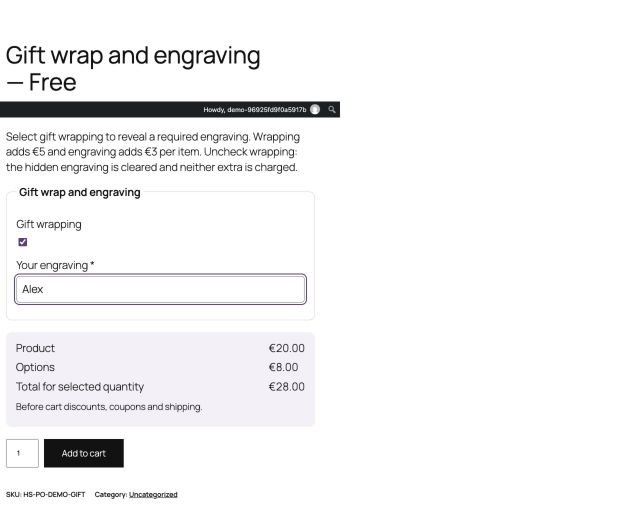
A field can depend on an earlier field being filled, equal to a value or different from a value. Put the controlling field before the dependent field. The editor prevents structural changes that would leave unsupported dependencies.
Pro supports all conditions and at least one condition. There is no nested condition-builder tree in this candidate. A hidden or invalid source does not satisfy a dependency. A hidden field’s old value is cleared, so a customer who makes it visible again must choose it again.
Example: show “Engraving text” only when “Personalization” is checked. Make the text required if engraving cannot be fulfilled without it. This does not make the field required when personalization is unchecked.
Divide a group into steps — Pro
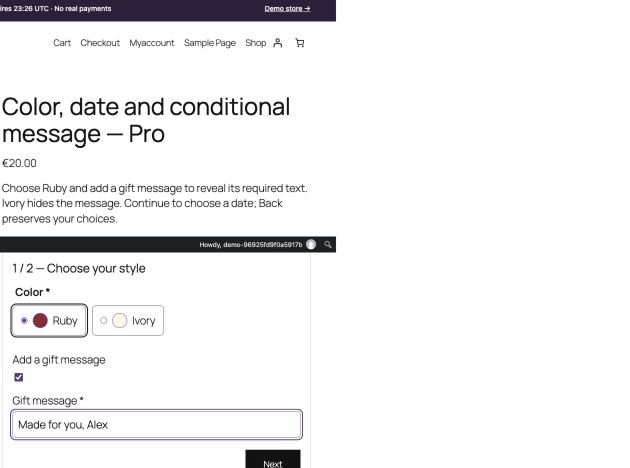
Choose “One step at a time”, name the steps and assign each field to a step. Every step needs at least one field, and fields must remain in step order. Use specific titles such as “Choose a finish” and “Add your message”.
Next checks the current visible fields. Back preserves valid selections. An attempted submission reveals the step containing a missing required field. Conditions still apply inside the steps; moving to another step does not remove the selected option from pricing.