

WooCommerce role-based pricing lets an eligible customer receive a different price because of their WordPress user role. For example, a retailer buying your mugs could receive 20% off while guests and ordinary customers pay the normal price. The rule depends on the signed-in account’s role, not on someone entering “wholesale” in a checkout field.
This example uses HookSpark Dynamic Pricing & Discount Rules and one simple product priced at $40. We will target an existing Wholesale role and verify the cart: two mugs should cost $64 for that role, compared with $80 for retail customers, before shipping and taxes. These are illustrative prices, not a tax calculation.
Before you create a wholesale pricing rule
Prepare a staging store, a $40 simple product without a sale price, and two controlled customer accounts: one ordinary Customer and one assigned to your existing Wholesale role. HookSpark selects roles already registered in WordPress; this pricing rule does not create a wholesale registration form, approve businesses or verify VAT numbers.
Do not give shoppers an administrator role to qualify them for a discount. Keep your business approval process separate from pricing, and test the real role ID used by your store. Start with other promotions disabled in the test environment and no coupon in the cart.
1. Limit the discount to one product and one role
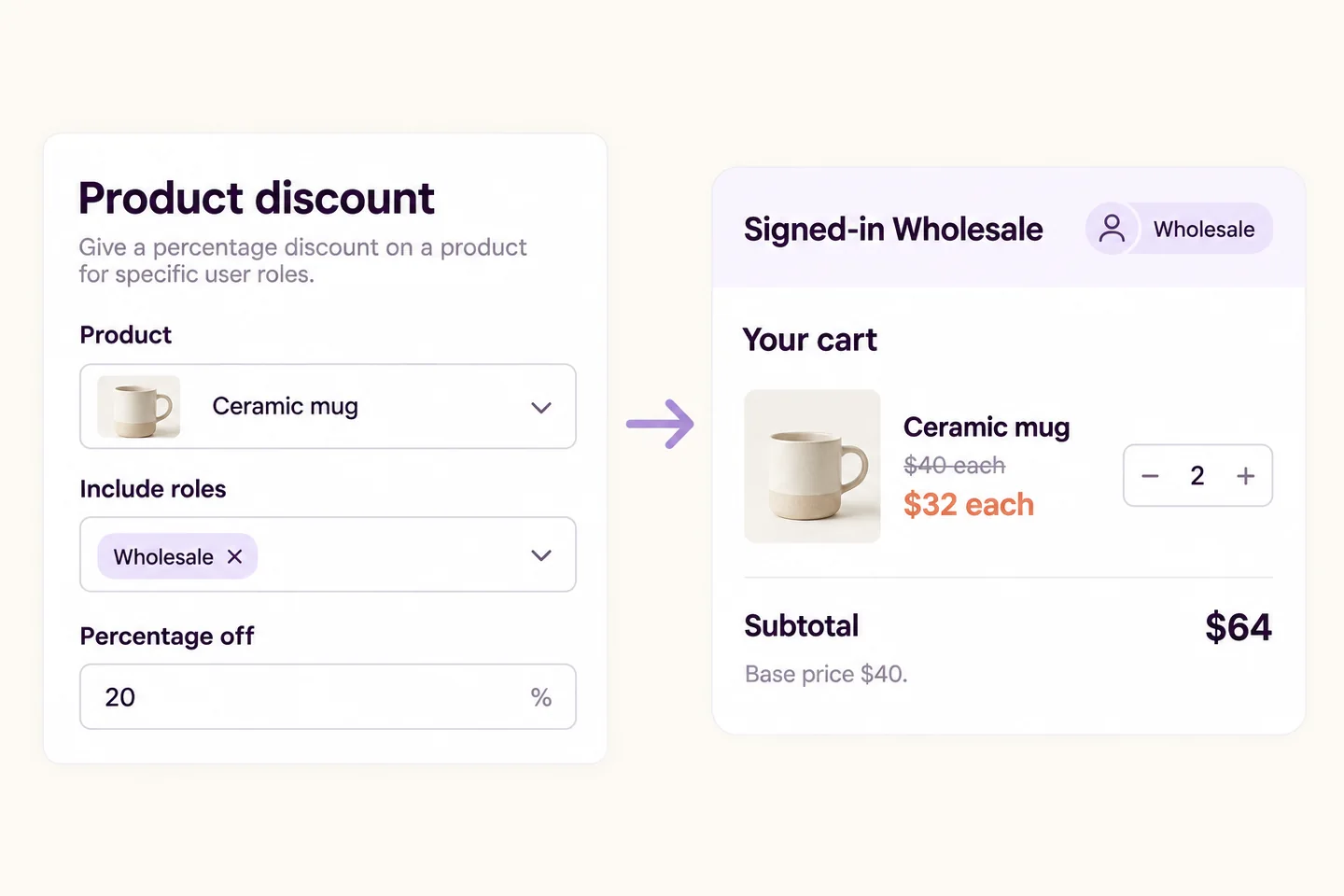
Open the HookSpark pricing promotion editor and create a promotion named “Wholesale mugs — 20%”. Choose Product discount, then Percentage off with a value of 20. Under Products and customers, select the mug in Include products and your Wholesale role in Include roles.
Leave Include customers empty when all accounts with that role should qualify. If you select both roles and individual customers, both conditions must match: choosing a role and an unrelated test account will not create two alternative audiences. An excluded role or customer takes precedence over an inclusion.
Keep the minimum quantity at 1, the maximum at 0 for no upper bound, and avoid an additional minimum spend or date window for this first example. Keep sale products excluded and the coupon policy conservative. Review the products, customers and timing guide before introducing more conditions. Enable and save the promotion when the test configuration is ready.
2. Compare three separate shopping sessions
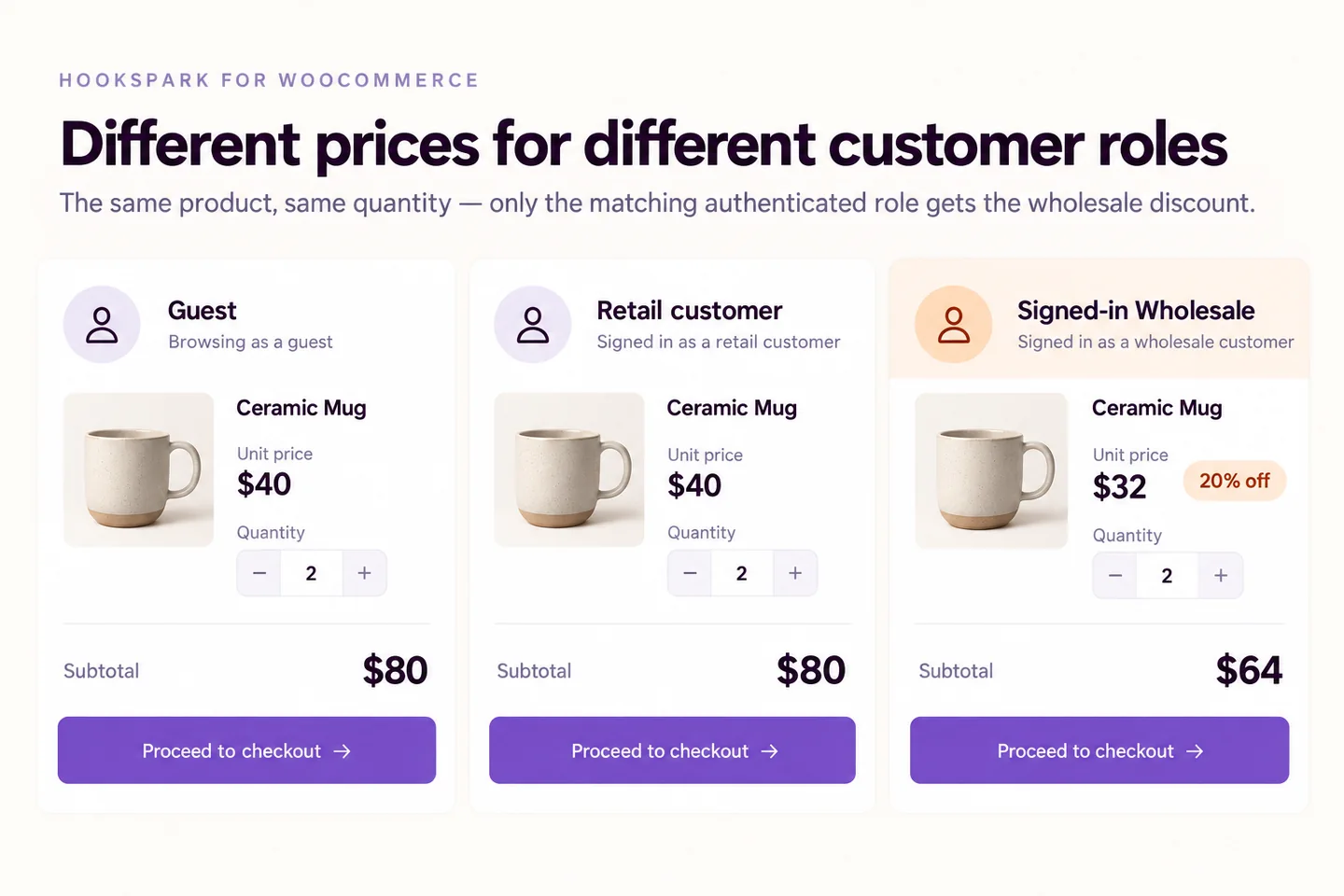
| Shopping session | Two mugs before tax and shipping | Expected rule result |
|---|---|---|
| Guest | $80 | No wholesale discount |
| Ordinary Customer | $80 | No wholesale discount |
| Account with the selected Wholesale role | $64 | 20% off the eligible mugs |
Use separate browser profiles or private sessions so one login does not contaminate another test. Rebuild the same cart in each session and check the line prices and totals. Add an unrelated product as a further check: it should keep its ordinary price because this promotion includes only the mug.
The comparison above defines the acceptance test; a simulator alone does not prove your storefront, account assignment or cache is correct. Repeat on your theme, verify checkout totals with a test payment method and review the resulting order before launch. Do not infer a permanently different catalogue price on every surface from a correct cart result.
Why is the wholesale discount missing—or visible to everyone?
If everyone receives it, first check Include roles: an empty audience means everyone, not nobody. If the intended account receives no discount, check its current role, exclusions, selected customer accounts and product selection. Then inspect sale-price exclusions, coupons, quantity limits, dates and other active promotions. Correct one condition at a time and repeat the three-session comparison.
Is role-based pricing the same as a quantity discount?
No. Role-based eligibility asks who is buying; quantity pricing asks how many units qualify. A retail customer buying ten mugs does not become a wholesaler. For quantity thresholds, use the bulk discount tutorial; for progressive bands, see tiered pricing. Test overlapping rules before combining them.
Can this replace a complete B2B store?
This tutorial covers one role-targeted discount. It does not establish business approval, tax exemption, invoice validation, payment terms or a hidden wholesale catalogue. If customers need negotiated prices instead, the request-a-quote workflow addresses a different purchasing need.
Start with one product, one approved role and the three clear expected totals. Explore HookSpark Dynamic Pricing & Discount Rules when you are ready to configure and test the rule.
Related guides
Products, customers and timing