
Min/Max · Development 0.12.0 · Updated 13 September 2026
Write helpful customer messages
Tell shoppers what needs to change. Keep the rule’s actual restriction visible, especially when the same text is used for many products.
Set the default messages
- Open HookSpark → Min/Max → Messages (“Messaggi”).
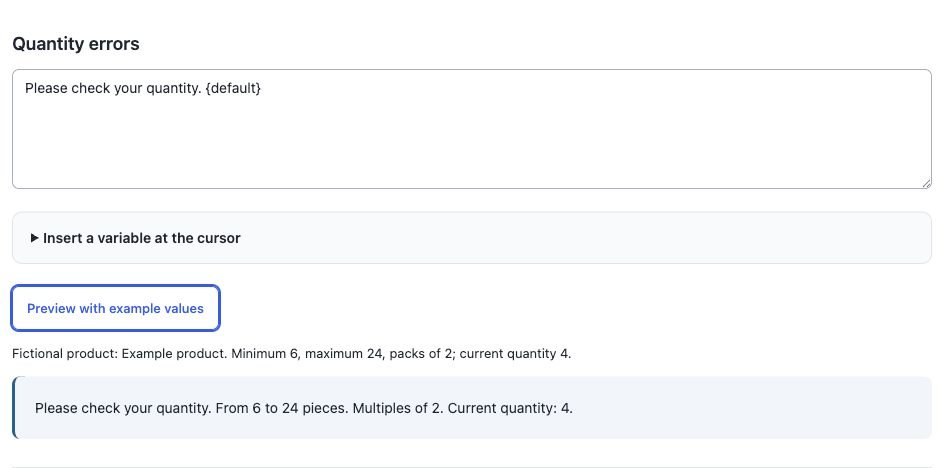
- Write the quantity message in Quantity errors and the monetary message in Amount errors.
- Expand the variable picker to insert a supported variable at the cursor.
- Select Preview with example values. Read both the fictional input values and the rendered message.
- Save messages. Previewing alone never saves the text.
A safe reusable quantity example is Please review your quantity. {default}. It keeps the built-in explanation relevant to the actual violation.
Override one rule
Open the rule and expand Customer message (“Messaggio per il cliente”). Enter its specific message and save the rule. The order is: non-empty per-rule message → global message for that metric → built-in explanation. Leave the rule text empty to inherit the global one; leave both empty to use the translated built-in text.
Variable reference
| Variable | Meaning / availability |
|---|---|
{product} | Product name in individual-product contexts; unavailable for an aggregate without a product. |
{rule}, {group} | The rule name. Both resolve to the rule name in this version. |
{minimum}, {maximum} | The configured threshold; unavailable if that threshold is empty. |
{multiple} | Quantity pack multiple, when set. Unavailable for amount rules. |
{current} | Current relevant quantity or amount. |
{missing} | Deficit to the minimum, never below zero. It is not the next valid pack size. |
{currency} | Stored currency code for amount rules; unavailable in quantity messages. |
{default} | The complete built-in explanation for this violation. |
Examples and limits
For a minimum-amount rule: Minimum spend: {minimum} {currency}. Current: {current} {currency}. {default}. With minimum 100 and current 80 EUR, the threshold and current amount are rendered from those values.
If a quantity rule has minimum 6 and multiple 6, current 7 has {missing} equal to 0 but is still invalid. Do not tell every customer to “add {missing}” as a universal fix.
Templates are plain text, at most 2000 bytes. No PHP or arbitrary HTML. Unknown variables and broken braces are rejected. If a listed variable is unavailable in a particular context, the entire message falls back to the built-in explanation rather than displaying an empty placeholder.
Verify and translate
Test an actual invalid cart and then correct it. The old error should clear. Global previews use fictional values, not your live cart. Saved custom messages are your content: translate them yourself; changing WordPress language does not automatically translate your wording.
If another session saved messages first, review the changed saved text and your retained draft before resubmitting. Do not repeatedly submit a stale editor.