
HS Min/Max Quantities · Development version 0.12.0
Choose products, customers and exclusions
Use inclusion to define the audience of a rule. Use exclusions to describe exceptions. An exception belongs to one rule, not to the entire store.
Choose the product scope first
- Individual product: select a published product or variation. A variable parent applies separately to its variations.
- Catalog selection: select relevant products, categories, tags or supported global attributes. Review the All/Any matching choice and whether quantities are counted separately or combined.
- Whole-cart quantity: evaluates the relevant cart total; a product selection is not required.
For a category rule, review whether subcategories should be included. Check a product that should match and one that should not; do not infer the selected scope from the rule name.
All or Any? Separate or combined?
All means each populated criterion must match; Any means at least one populated criterion is enough. Category Mugs plus tag Wholesale under All selects their intersection; Any selects either set. A matching cart line is not counted twice. Attribute matching uses supported global attribute terms, including the customer’s selected variation attributes; it is not a sum of numeric attribute values.
Separate counting applies the limit to each product/variation identity. Combined counting sums eligible units: six A plus six B meet a combined minimum of 12, but do not meet a separate minimum of 12 for each. Whole-cart quantity counts pieces, not the number of lines.
Use the catalog-match preview to inspect examples of matching products and its pagination. It is a draft preview, not a saved rule or a complete cart simulation.
Open Customers and exceptions
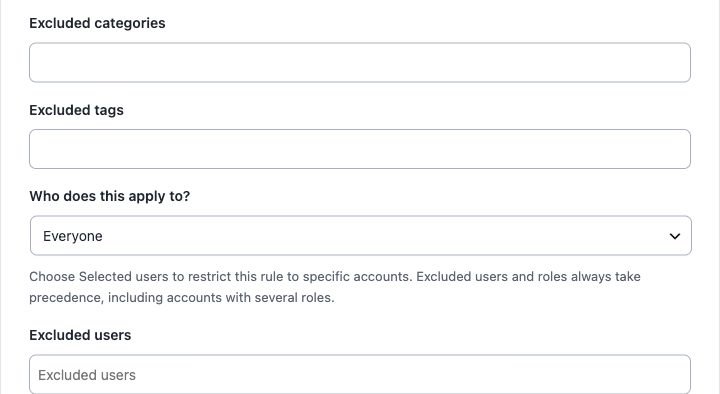
Expand Customers and exceptions (“Clienti ed eccezioni”) in the rule editor. Search a selector and choose a result. Save after making changes.
Three product exceptions with different effects
| Setting | Effect in this rule |
|---|---|
| Exempt products | Not restricted individually. For combined rules they still contribute to the count, but an exempt-only cart does not trigger the rule. |
| Products not counted | Do not contribute to combined totals or trigger the rule. If also exempt, exclusion from the count wins. |
| Excluded categories or tags | Remove matching items from this rule and its totals entirely. Category exclusions include descendants; variations use their parent taxonomy. |
Example: for a combined minimum of 12, six ordinary units plus six exempt units can satisfy the minimum. Six ordinary units plus six not-counted units cannot: the relevant total is still six.
Target customers
- Choose everyone, guests only, signed-in customers, selected roles or selected users.
- For selected users, search for and choose at least one account. Guests and unselected accounts are outside that audience.
- Add excluded accounts or excluded roles if needed. An excluded role or account wins over inclusion within this rule, even when an account has several roles.
- Save and test with accounts that represent both included and excluded customers.
Empty exclusion fields exclude nothing. Another independent rule may still constrain an excluded customer or product. Each new category/tag/user selector supports up to 100 values.
When the catalog changes
Category and tag membership is evaluated against the catalog. Review affected rules after deleting terms, products or accounts; diagnostics can identify missing references. When transferring user-specific rules, read the site-bound account restrictions.